Environment
Ubuntu 24.04.1 LTS x86_64
Build QEMU v9.2.1
- Install QEMU dependencies and build
cd ${HOME}
git clone -b v9.2.1 https://github.com/qemu/qemu
cd qemu
mkdir build
cd build

sudo apt-get install -y python3-venv python3-pip python3-setuptools \
                        ninja-build rustc bindgen meson \
                        sparse pkg-config libglib2.0-dev flex bison \
                        libcap-ng-dev libasound2-dev \
                        libbpf-dev libxdp-dev libbrlapi-dev \
                        libbz2-dev libcapstone-dev libpam0g-dev \
                        libcurl4-openssl-dev \
                        libncurses5-dev libncursesw5-dev libgcrypt20-dev \
                        libfuse3-dev libglusterfs-dev libgnutls28-dev \
                        libpixman-1-dev libgtk-3-dev \
                        gettext libjack-jackd2-dev libnfs-dev \
                        libiscsi-dev libudev-dev libssh-dev \
                        libcbor-dev libusb-1.0-0-dev libpmem-dev \
                        libdaxctl-dev libkeyutils-dev libdw-dev \
                        libaio-dev liburing-dev liblzfse-dev \
                        liblzo2-dev multipath-tools libpulse-dev \
                        libpipewire-0.3-dev libnuma-dev libqatzip-dev \
                        qatzip libsdl2-dev \
                        librados-dev librgw-dev libradosstriper-dev \
                        librados-dev librgw-dev librbd-dev \
                        librdmacm-dev libibverbs-dev \
                        libseccomp-dev libsdl2-image-dev libcacard-dev \
                        libspice-protocol-dev libspice-server-dev \
                        libsnappy-dev libvde-dev libvdeplug-dev \
                        libusbredirparser-dev libjson-c-dev \
                        libcmocka-dev libvirglrenderer-dev \
                        libsasl2-dev libxen-dev libvte-2.91-dev \
                        clang

../configure \
  --enable-af-xdp --enable-alsa --enable-attr --enable-auth-pam --enable-avx2 --enable-avx512bw \
  --enable-bochs --enable-bpf --enable-brlapi --enable-bzip2 \
  --enable-cap-ng --enable-capstone --enable-cloop --enable-colo-proxy \
  --enable-crypto-afalg --enable-curl --enable-curses --enable-dbus-display --enable-dmg --enable-docs \
  --enable-fuse --enable-fuse-lseek --enable-gcrypt --enable-gettext --enable-gio \
  --enable-glusterfs --enable-gnutls --enable-gtk --enable-gtk-clipboard --enable-guest-agent \
  --enable-hv-balloon --enable-iconv --enable-jack --enable-keyring \
  --enable-kvm --enable-l2tpv3 --enable-libcbor --enable-libdaxctl --enable-libdw --enable-libiscsi \
  --enable-libkeyutils --enable-libnfs --enable-libpmem --enable-libssh --enable-libudev --enable-libusb \
  --enable-libvduse --enable-linux-aio --enable-linux-io-uring --enable-lzfse --enable-lzo --enable-malloc-trim \
  --enable-membarrier --enable-modules --enable-multiprocess \
  --enable-numa --enable-opengl --enable-oss --enable-pa --enable-parallels --enable-pipewire \
  --enable-pixman --enable-plugins --enable-png --enable-qcow1 --enable-qed \
  --enable-rbd --enable-rdma --enable-replication --enable-sdl \
  --enable-sdl-image --enable-seccomp --enable-selinux --enable-slirp --enable-slirp-smbd --enable-smartcard \
  --enable-snappy --enable-sndio --enable-sparse --enable-spice --enable-spice-protocol --enable-stack-protector \
  --enable-tcg --enable-tools --enable-tpm --enable-usb-redir --enable-vde --enable-vdi \
  --enable-vduse-blk-export --enable-vhdx --enable-vhost-crypto --enable-vhost-kernel \
  --enable-vhost-net --enable-vhost-user --enable-vhost-user-blk-server --enable-vhost-vdpa --enable-virglrenderer \
  --enable-virtfs --enable-vmdk --enable-vnc --enable-vnc-jpeg --enable-vnc-sasl --enable-vpc \
  --enable-vte --enable-vvfat --enable-werror --enable-xen --enable-xen-pci-passthrough \
  --enable-xkbcommon --enable-zstd --enable-system --enable-user --enable-linux-user \
  --enable-pie

make -j$(nproc)
OVMF Build with SecureBoot support
- Install Dependencies
sudo apt install -y nasm iasl
- Setup build Configuration
cd ${HOME}
git clone -b edk2-stable202502 https://github.com/tianocore/edk2
cd edk2
git submodule update --init
make -C BaseTools -j$(nproc)
. edksetup.sh
- Open target.txt to edit
open ./Conf/target.txt
- Edit as below
ACTIVE_PLATFORM      = EmulatorPkg/EmulatorPkg.dsc

TOOL_CHAIN_TAG       = GCC5

TARGET_ARCH          = X64
- Build
build -DSECURE_BOOT_ENABLE=TRUE -DDEBUG_ON_SERIAL_PORT=TRUE
Built Folder:
${HOME}/Build/OvmfX64/DEBUG_GCC5/FV
Setup SecureBoot Configuration
cd ${HOME}
mkdir work
cd work
mkdir hda-contents

cp ${HOME}/edk2/Build/OvmfX64/DEBUG_GCC5/X64/ShellPkg/Application/Shell/Shell/DEBUG/Shell.efi hda-contents/Shell.efi
cp ${HOME}/edk2/Build/OvmfX64/DEBUG_GCC5/FV/OVMF_CODE.fd .
cp ${HOME}/edk2/Build/OvmfX64/DEBUG_GCC5/FV/OVMF_VARS.fd .

# Generate PK
openssl req -newkey rsa:2048 -nodes -keyout PKpriv.key -x509 -days 3650 -out PK.crt
openssl x509 -in PK.crt -outform der -out PK.der

cp PK.der ./hda-contents/PK.der
Put KEK, DB to ./hda-contents/PK.der
Download KEK (Key Exchange Key)
allows updates to DB and DBX.
- Microsoft Corporation KEK CA 2011: https://go.microsoft.com/fwlink/p/?linkid=321185
→ MicCorKEKCA2011_2011-06-24.crt - Microsoft Corporation KEK 2K CA 2023: https://go.microsoft.com/fwlink/p/?linkid=2239775
→ microsoft corporation kek 2k ca 2023.crt
Download DB (Allowed Signature database)
This CA in the Signature Database (DB) allows Windows to boot.
- Microsoft Windows Production CA 2011 https://go.microsoft.com/fwlink/?LinkId=321192
→ MicWinProPCA2011_2011-10-19.crt - Windows UEFI CA 2023 https://go.microsoft.com/fwlink/p/?linkid=2239776
→ windows uefi ca 2023.crt
Microsoft signer for third party UEFI binaries via DevCenter program.
- Microsoft Corporation UEFI CA 2011 https://go.microsoft.com/fwlink/p/?linkid=321194
→ MicCorUEFCA2011_2011-06-27.crt - Microsoft UEFI CA 2023 https://go.microsoft.com/fwlink/?linkid=2239872
→microsoft uefi ca 2023.crt - Microsoft Option ROM UEFI CA 2023 https://go.microsoft.com/fwlink/?linkid=2284009
→ microsoft option rom uefi ca 2023.crt
Enroll Certificates
- Boot
${HOME}/qemu/build/qemu-system-x86_64 -L . \
  -drive if=pflash,format=raw,readonly=on,file=OVMF_CODE.fd \
  -drive if=pflash,format=raw,file=OVMF_VARS.fd \
  -hda fat:rw:hda-contents \
  -net none
- Press F2 Key
- Enter Device Manager > Secure Boot Configuration
- Modify to “Custom Mode” at Secure Boot Mode
- Enter Custom Secure Boot Options > PK Options > Enroll PK, KEK, DB
Install OS
Windows
- Download virtio-win.iso
- Create qcow2 image and Install Windows 10
cd ${HOME}
mkdir win10_20h1
cd win10_20h1;
cp ${HOME}/work/OVMF_* .

# Create qcow2 image
${HOME}/qemu/build/qemu-img create -f qcow2 win10_20h1.qcow2 128G

# Install
${HOME}/qemu/build/qemu-system-x86_64 \
  -cdrom win10_20h1.iso \
  -enable-kvm \
  -m 8192 \
  -cpu host \
  -smp 16 \
  -drive file=win10_20h1.qcow2,if=virtio,format=qcow2 \
  -boot menu=on \
  -drive file=virtio-win-0.1.266.iso,media=cdrom \
  -drive if=pflash,format=raw,readonly=on,file=OVMF_CODE.fd \
  -drive if=pflash,format=raw,file=OVMF_VARS.fd \
  -netdev user,id=n1,hostfwd=tcp::2222-:22 \
  -device virtio-net,netdev=n1 \
  -vga std

# Run
${HOME}/qemu/build/qemu-system-x86_64 \
  -enable-kvm \
  -m 8192 \
  -cpu host \
  -smp 16 \
  -drive file=win10_20h1.qcow2,if=virtio,format=qcow2 \
  -drive if=pflash,format=raw,readonly=on,file=OVMF_CODE.fd \
  -drive if=pflash,format=raw,file=OVMF_VARS.fd \
  -netdev user,id=n1,hostfwd=tcp::2222-:22 \
  -device virtio-net,netdev=n1 \
  -usb -device usb-tablet \
  -vga std
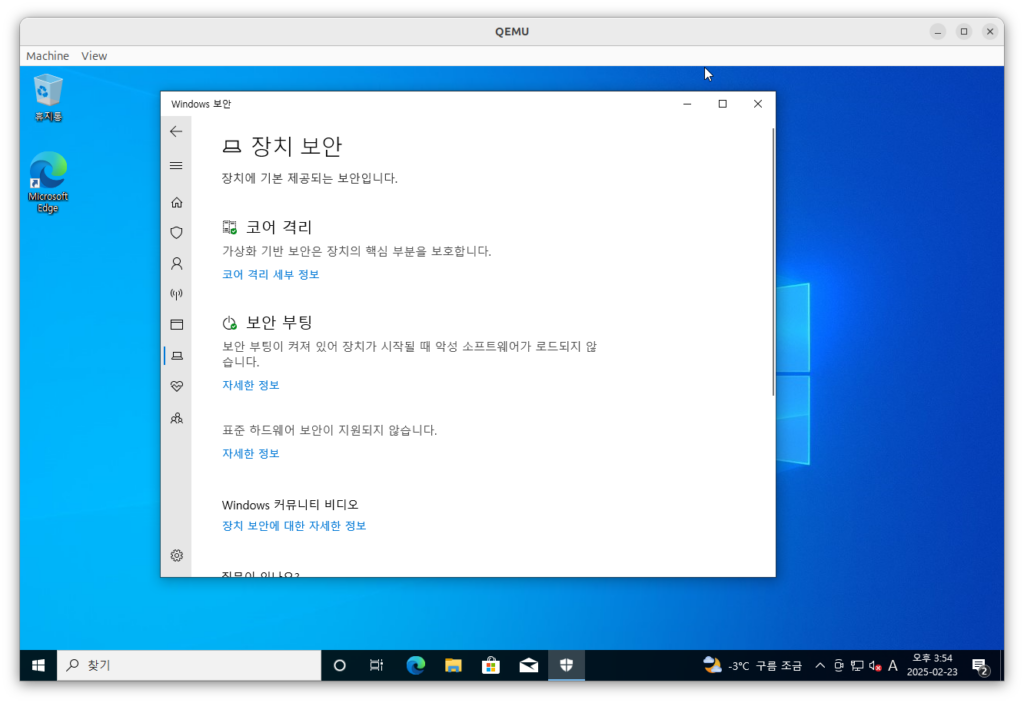
Enjoy SecureBoot!
Download
https://cloud.h4ck.kr/index.php/s/mUfB4OBxKItW5tO
Reference
https://wiki.ubuntu.com/UEFI/EDK2#Building_OvmfPkg_with_Secure_Boot_support
https://github.com/tianocore/tianocore.github.io/wiki/How-to-build-OVMF