도움주신 고마운 분
- dlevi309 (가상 아이폰에서 터치 상호작용에 대한 아이디어 제공)
- khanhduytran0, 34306, asdfugil, verygenericname (가상 아이폰 구축하는데 기타 아이디어 제공 (Cryptex, Device Activation, Ramdisk 부팅 관련 등등))
- ma4the, Mard, SwallowS (가상 아이폰 작동 테스트)
동기
애플은 2024년 후반쯤에 클라우드 기반 AI 개인정보 보호를 위한 새로운 지평을 연답시고 Private Cloud Compute를 공개하기 시작했다. 그러다 2025년 후반쯤에 흥미로운 소식이 들려오는데, 애플이 PCC 펌웨어에 cloudOS 26 버전부터 vphone600ap 관련 컴포넌트가 새로 추가되었다는 점이다.
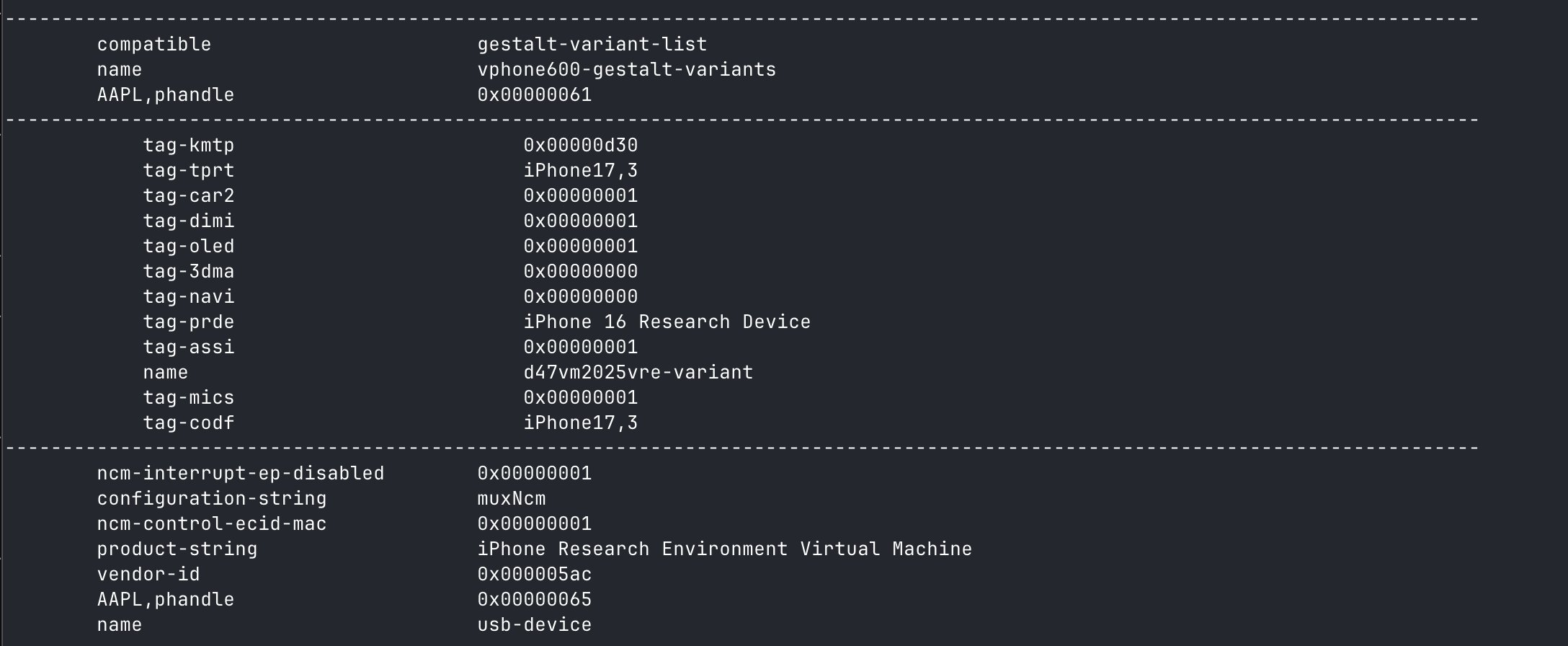
출처: https://x.com/matteyeux/status/2006339694783848660/photo/1
"iPhone Research Environment Virtual Machine”?
애플이 추후 다른 보안 연구원 분들을 위해 가상 아이폰 환경을 구축하여 배포하려고 만든 계획일까, 아니면 실수일까? 2021년 iOS 15.0 beta ~ 15.1 beta3 OTA에서 DEVELOPMENT/KASAN 빌드용 커널이 발견된적이 있는데, 실수했을 가능성도 없지 않아 있을 것 같다. 발견된 기간은 대략 2021년 6월부터 10월까지, 약 4개월동안 포함되어왔다.
그러다 올해 1월 쯤에 vphone600ap 관련 컴포넌트를 활용한 가상 아이폰을 띄우는 트윗이 공개되었다.
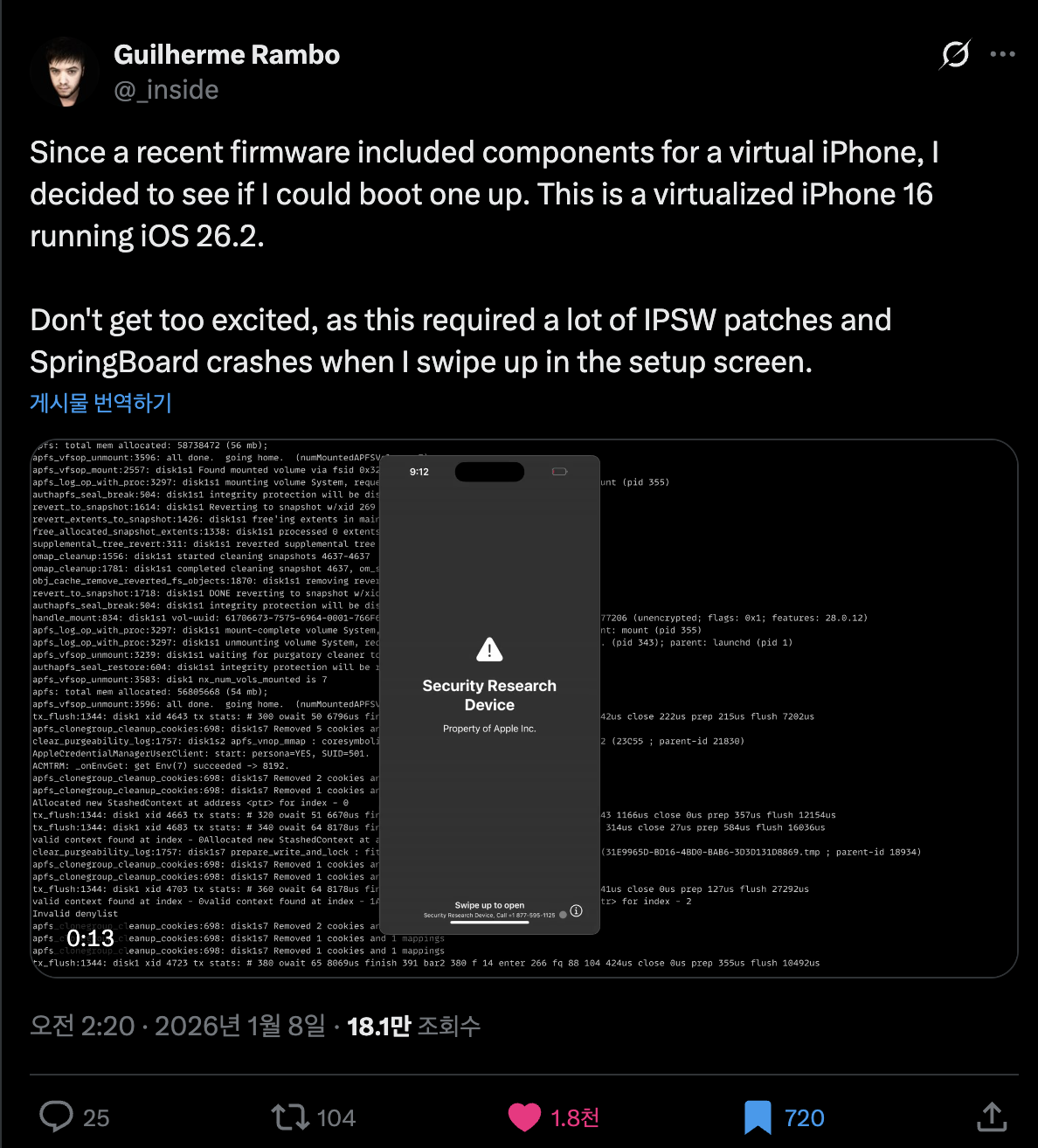
출처: https://x.com/_inside/status/2008951845725548783
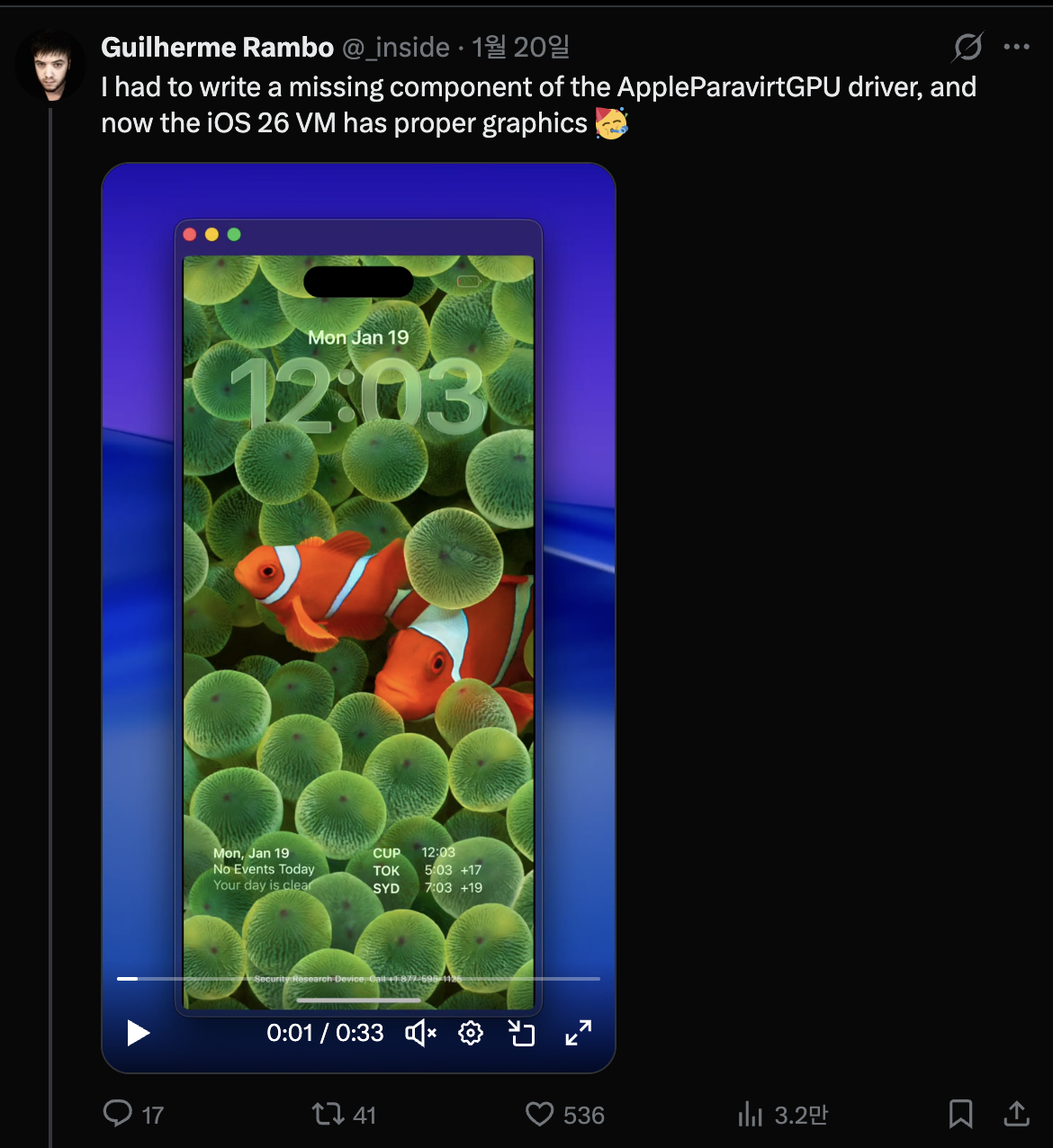
봤을때, 정말 거의 모든것들이 우아하게 잘 작동하였다. 이전에 내가 봐왔던 QEMUAppleSilicon(Inferno) 프로젝트에 비하면 훨씬 더 빠릿하고 부드럽게 작동한다. 더군다나 Metal 가속화까지 가능해보였다.
결국 현혹된 나머지 다짜고짜 1월 31일, 가상 아이폰을 만들어보기 시작했다.

가상 아이폰을 띄우기 위해 super-tart 개조하기
참고한 프로젝트는 security-pcc이다. /System/Library/SecurityResearch/usr/bin/vrevm 바이너리의 소스코드와 대응된다. 흥미로운 점은 Virtualization.framework에서 제공되는 Private 메소드를 사용하고 있다. PCC 리서치에 사용되는 가상머신에서는 하드웨어 모델을 초기화하는 과정 중 ISA와 PlatformVersion을 따로 지정해주는 것을 볼 수 있다.
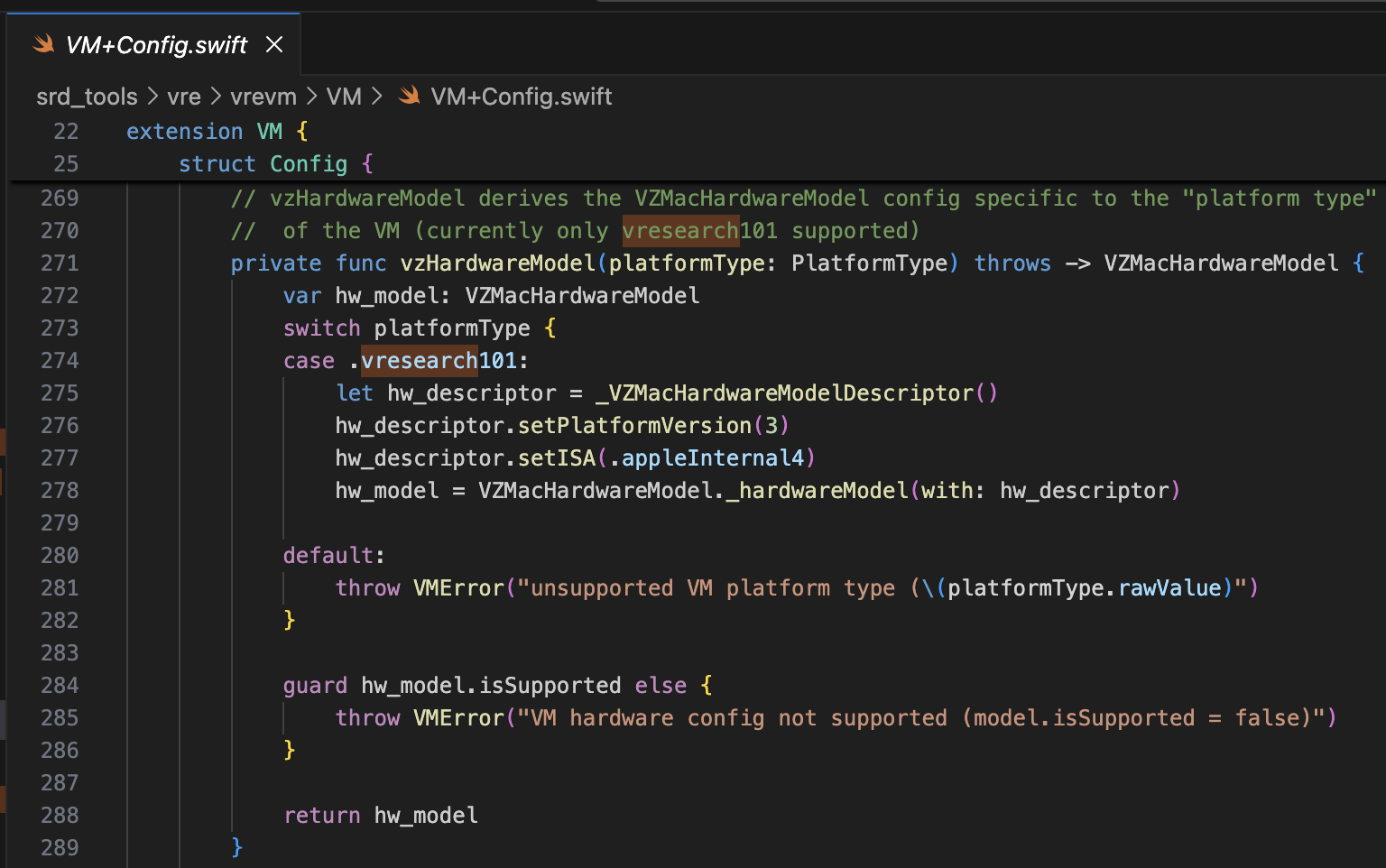
부트롬은 AVPBooter.vresearch1.bin이 사용되고,(/System/Library/Frameworks/Virtualization.framework/Resources/AVPBooter.vresearch1.bin)
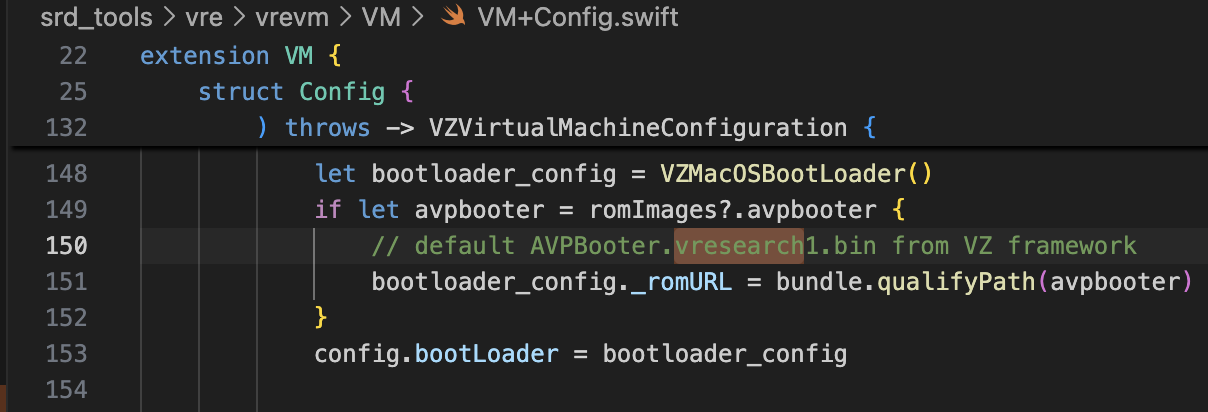
SEPROM(avpsepbooter)은 AVPSEPBooter.vresearch1.bin이 사용되며, AuxiliaryStorage와 비슷한 역할을 하는 SEPStorage 파일을 별도로 불러온다. (/System/Library/Frameworks/Virtualization.framework/Versions/A/Resources/AVPSEPBooter.vresearch1.bin)
또다른 흥미로운 점은 해상도를 설정하는 코드를 살펴보면 1290×2796으로, 이는 iPhone 14 Pro Max, 15 Plus, 15 Pro Max, 16 Plus 기기와 대응된다.
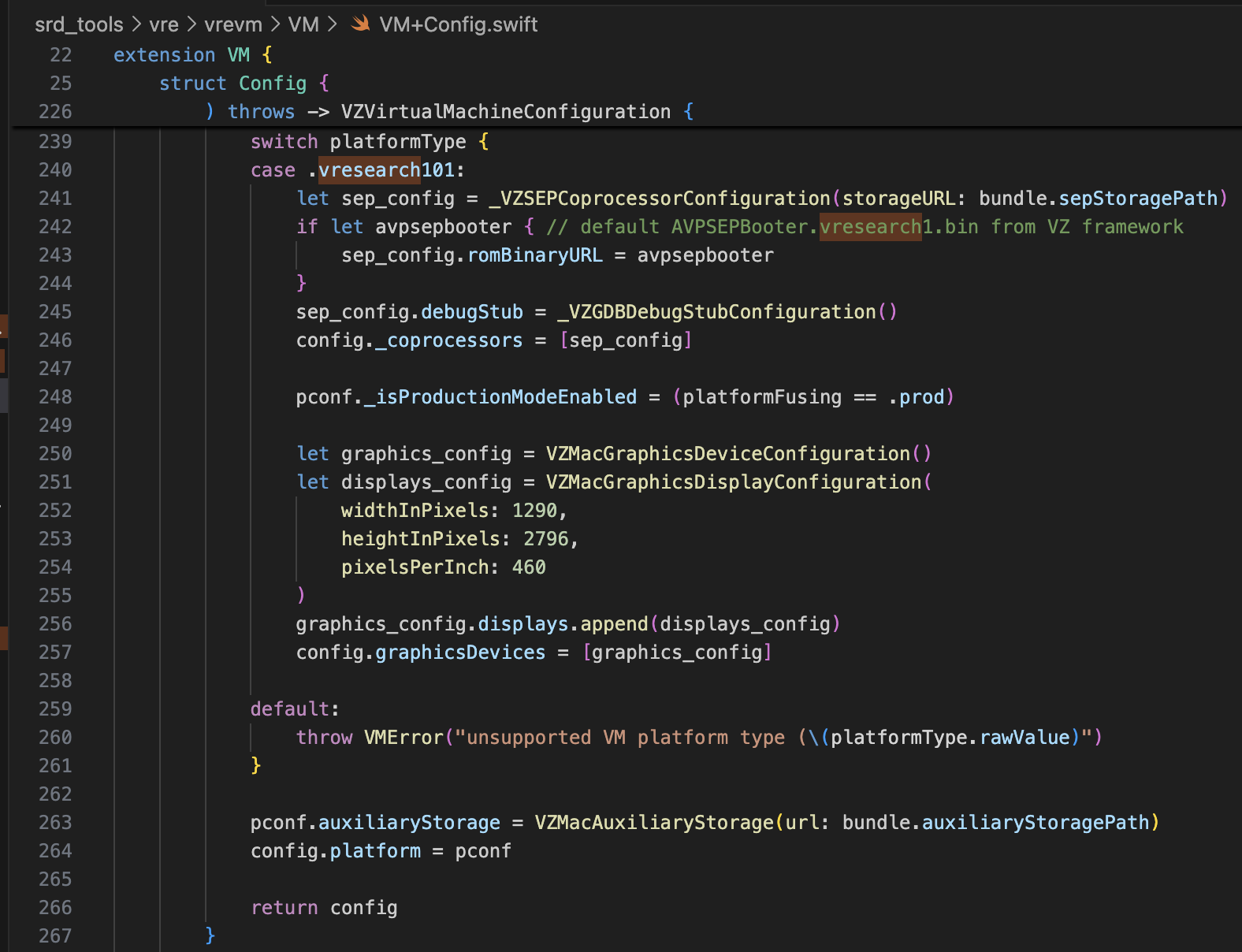
여기까지의 정보만으로, 충분히 가상 아이폰을 띄우기 위해 super-tart를 개조할 수 있을 것이다. 필자는 아래와 같이 수정해주었다.
- /Sources/tart/VM.swift
...
class VM: NSObject, VZVirtualMachineDelegate, ObservableObject {
...
  // vzHardwareModel derives the VZMacHardwareModel config specific to the "platform type"
  // of the VM (currently only vresearch101 supported)
  static private func vzHardwareModel_VRESEARCH101() throws -> VZMacHardwareModel {
    var hw_model: VZMacHardwareModel

    guard let hw_descriptor = _VZMacHardwareModelDescriptor() else {
      fatalError("Failed to create hardware descriptor")
    }
    hw_descriptor.setPlatformVersion(3) // .appleInternal4 = 3
    hw_descriptor.setBoardID(0x90)
    hw_descriptor.setISA(2)
    hw_model = VZMacHardwareModel._hardwareModel(withDescriptor: hw_descriptor)

    guard hw_model.isSupported else {
        fatalError("VM hardware config not supported (model.isSupported = false)")
    }

    return hw_model
  }

  static func craftConfiguration(
    diskURL: URL,
    nvramURL: URL,
    romURL: URL,
    sepromURL: URL? = nil,
    vmConfig: VMConfig,
    network: Network = NetworkShared(),
    additionalStorageDevices: [VZStorageDeviceConfiguration],
    directorySharingDevices: [VZDirectorySharingDeviceConfiguration],
    serialPorts: [VZSerialPortConfiguration],
    suspendable: Bool = false,
    nested: Bool = false,
    audio: Bool = true,
    clipboard: Bool = true,
    sync: VZDiskImageSynchronizationMode = .full,
    caching: VZDiskImageCachingMode? = nil
  ) throws -> VZVirtualMachineConfiguration {
    let configuration: VZVirtualMachineConfiguration = .init()

    // Boot loader
    let bootloader = try vmConfig.platform.bootLoader(nvramURL: nvramURL)
    Dynamic(bootloader)._setROMURL(romURL)
    configuration.bootLoader = bootloader

    // SEP ROM
    let homeURL = FileManager.default.homeDirectoryForCurrentUser
    var sepstoragePath = homeURL.appendingPathComponent(".tart/vms/vphone/SEPStorage").path
    let sepstorageURL = URL(fileURLWithPath: sepstoragePath)
    let sep_config = Dynamic._VZSEPCoprocessorConfiguration(storageURL: sepstorageURL)
    if let sepromURL { // default AVPSEPBooter.vresearch1.bin from VZ framework
        sep_config.romBinaryURL = sepromURL
    }
    sep_config.debugStub = Dynamic._VZGDBDebugStubConfiguration(port: 8001)
    configuration._setCoprocessors([sep_config.asObject])

    // Some vresearch101 config
    let pconf = VZMacPlatformConfiguration()
    pconf.hardwareModel = try vzHardwareModel_VRESEARCH101()

    let serial = Dynamic._VZMacSerialNumber.initWithString("AAAAAA1337")
    let identifier = Dynamic.VZMacMachineIdentifier._machineIdentifierWithECID(0x1111111111111111, serialNumber: serial.asObject)
    pconf.machineIdentifier = identifier.asObject as! VZMacMachineIdentifier

    pconf._setProductionModeEnabled(true)
    var auxiliaryStoragePath = homeURL.appendingPathComponent(".tart/vms/vphone/nvram.bin").path
    let auxiliaryStorageURL = URL(fileURLWithPath: auxiliaryStoragePath)
    pconf.auxiliaryStorage = VZMacAuxiliaryStorage(url: auxiliaryStorageURL)

    if #available(macOS 14, *) {
      let keyboard = VZUSBKeyboardConfiguration()
      configuration.keyboards = [keyboard]
    }

    if #available(macOS 14, *) {
      let touch = _VZUSBTouchScreenConfiguration()
      configuration._setMultiTouchDevices([touch])
    }
    ...
    configuration.platform = pconf

    // Display
    let graphics_config = VZMacGraphicsDeviceConfiguration()
    let displays_config = VZMacGraphicsDisplayConfiguration(
        widthInPixels: 1179,
        heightInPixels: 2556,
        pixelsPerInch: 460
    )
    graphics_config.displays.append(displays_config)
    configuration.graphicsDevices = [graphics_config]
 ...
펌웨어 개조하기
참고한 프로젝트는 vma2pwn이다. 12.0.1 버전을 한정으로, 거의 모든 부트체인을 수정한 맥 가상머신을 띄워준다.
prepare.sh 스크립트를 먼저 살펴보자. IM4P 형식으로로 압축된 부트로더나 커널 등 펌웨어 구성요소들을 RAW 형식으로 추출하고 하드코딩된 특정 주소에 있는 명령어/데이터들을 패치한다. RestoreRamdisk는 펌웨어를 복원할때 사용되는 루트 파일 시스템이고, AVPBooter는 가상머신에서 사용되는 BootROM이다.
정리하자면, 펌웨어에 들어간 각각의 파일들을 추출하여 커스텀 펌웨어를 복워 가능케하기 위해 무결성 검증을 패치하거나, 부팅 관련 로그를 쉽게 보도록 boot-args 매개변수를 수정한다.
마지막으로 vma2pwn.sh는 커스텀펌웨어를 복원해주는 역할을 한다. 사전에 DFU 모드로 진입해서 복원하는데, 여기서 가상머신은 super-tart라는 것을 사용한다. 기존 tart 가상머신에다가 커스텀 부트롬, 시리얼 출력, DFU 모드, GDB 디버깅까지 기능을 추가한 버전이다. (참고로, SIP/AMFI 비활성화를 해줘야 작동한다)
최근에도 꽤나 유용하게 사용했었는데, XNU 커널 1데이 취약점(CVE-2021-30937, CVE-2021-30955)을 공부하려는데 썼다. 커널 라이브 디버깅을 지원해서 아주 좋다.
커스텀 펌웨어 만들기
cloudOS 26.1(23B85)와 iOS 26.1(iPhone17,3; 23B85) 구성요소를 믹싱했는데,
기억이 자세히는 잘나지 않는다. 정확히 말하자면, 아이폰 16과 vphone 관련 컴퍼넌트를 적절히 믹싱해서 커스텀 펌웨어를 만들어야하는데, 어떤걸 믹싱했는지 기억나지 않는다는거다. 내 기억상으론,
- BuildManifest.plist 파일의 경우: Manifest 키 하위의 딕셔내리 요소들중 수정하였는데, 복원할때 iPhone 16(iOS 26.1) 모델에서의 SystemVolume, SystemVolumeCanonicalMetadata, OS, StaticTrustCache, RestoreTrustCache, RestoreRamDisk들이 사용되도록 만들고, 나머지는 PCC 펌웨어의 vphone 관련 파일들이 사용되도록 만들어뒀던 것 같다.
- Restore.plist 파일의 경우: DeviceMap 관련 프로퍼티나 SupportedProductTypes들을 추가하거나, SystemRestoreImageFileSystems 요소를 변경했던 것 같다.
아래 파일들은 내가 믹싱한 최종 결과물이다.
- get_fw.py (일부 내용)
...

# 3. Import things from cloudOS
# kernelcache
os.system("cp 399b664dd623358c3de118ffc114e42dcd51c9309e751d43bc949b98f4e31349_extracted/kernelcache.* iPhone17,3_26.1_23B85_Restore")
# agx, all_flash, ane, dfu, pmp...
os.system("cp 399b664dd623358c3de118ffc114e42dcd51c9309e751d43bc949b98f4e31349_extracted/Firmware/agx/* iPhone17,3_26.1_23B85_Restore/Firmware/agx")
os.system("cp 399b664dd623358c3de118ffc114e42dcd51c9309e751d43bc949b98f4e31349_extracted/Firmware/all_flash/* iPhone17,3_26.1_23B85_Restore/Firmware/all_flash")
os.system("cp 399b664dd623358c3de118ffc114e42dcd51c9309e751d43bc949b98f4e31349_extracted/Firmware/ane/* iPhone17,3_26.1_23B85_Restore/Firmware/ane")
os.system("cp 399b664dd623358c3de118ffc114e42dcd51c9309e751d43bc949b98f4e31349_extracted/Firmware/dfu/* iPhone17,3_26.1_23B85_Restore/Firmware/dfu")
os.system("cp 399b664dd623358c3de118ffc114e42dcd51c9309e751d43bc949b98f4e31349_extracted/Firmware/pmp/* iPhone17,3_26.1_23B85_Restore/Firmware/pmp")
# sptm, txm, etc...
os.system("cp 399b664dd623358c3de118ffc114e42dcd51c9309e751d43bc949b98f4e31349_extracted/Firmware/*.im4p iPhone17,3_26.1_23B85_Restore/Firmware")

# 4. TODO: parse what things needed from BuildManifest.plist, Restore.plist in cloudOS 26.1
# It will be really complicated, so import things from already parse completed
os.system("sudo cp custom_26.1/BuildManifest.plist iPhone17,3_26.1_23B85_Restore")
os.system("sudo cp custom_26.1/Restore.plist iPhone17,3_26.1_23B85_Restore")

os.system("echo 'Done, grabbed all needed components for restoring'")
AVPBooter.vresearch1.bin 패치하기
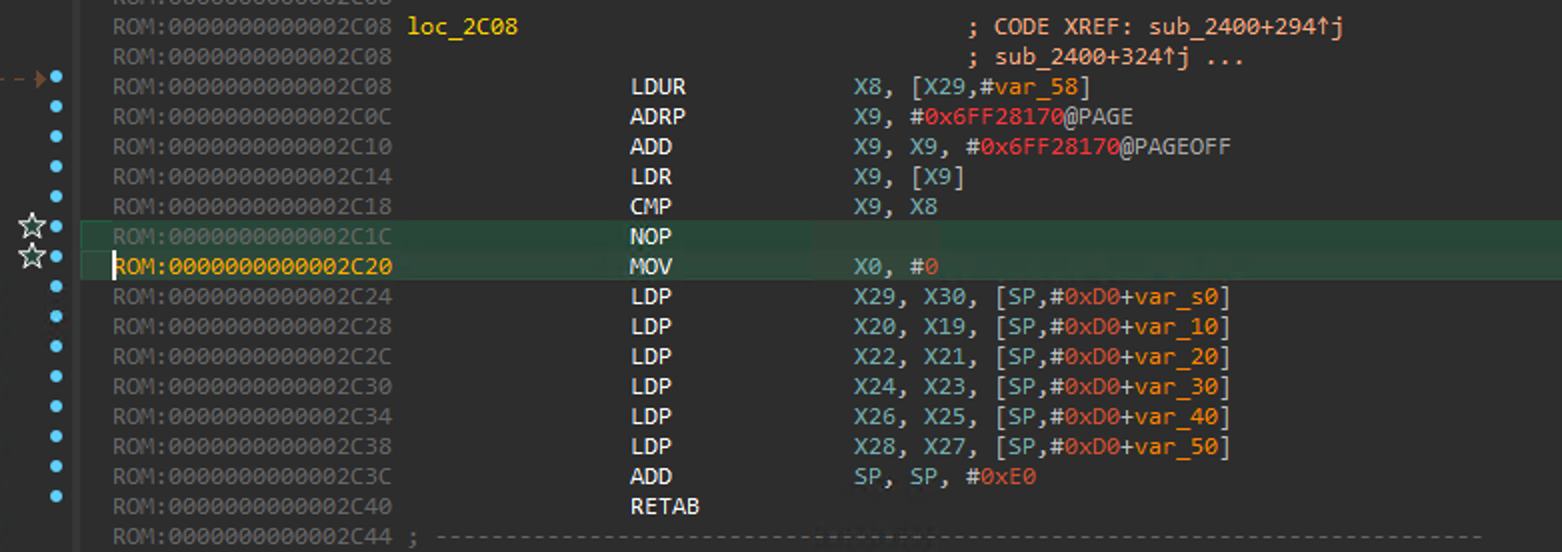
해당 게시물을 참고하였다. image4_validate_property_callback을 패치해주어야만, 그 다음으로 커스텀 부트로더를 로드시켜줄 수 있다. IDA Pro에서 Text-search (slow!) 기능을 통해 “0x4447”를 검색하고 해당 함수의 에필로그 부분에서 항상 0을 반환하도록 패치해주면 된다.
libirecovery 수정/빌드하기
펌웨어 복원하는데에 앞서 vresearch101ap 모델을 지원하기 위해서는 약간의 수정이 필요했다.
빌드하고 나면, idevicerestore 툴로 펌웨어 복원이 가능해진다.
https://github.com/wh1te4ever/libirecovery

펌웨어 구성요소 패치하기
AVPBooter와 마찬가지로, 복원하는데 들어가는 부트로더인 iBSS, iBEC은 서명 검증을 우회하기 위해 패치하였고, 부팅하는데 문제 있으면 원인을 바로 파악하기 위해 시리얼 로그가 출력되도록 만들었다.
나중에 보면 알게 되겠지만, 임의의 Cryptex를 로드시키기 위해서는 SSV 검증 우회가 필요하다. DFU가 아닌 일반모드에서 부팅할때 로드되는 LLB에서 수행되며, 커널에서도 검증이 수행되기도 한다.
그리고 TXM을 패치하는데, Trustcache에 등록된 바이너리/라이브러리가 아니더라도, 마치 등록된것 마냥 인식되게끔 만들었다.
- patch_fw.py (일부 내용, 파트1)
# Patch iBSS
# patch image4_validate_property_callback
patch(0x9D10, 0xd503201f)   #nop
patch(0x9D14, 0xd2800000)   #mov x0, #0

# Patch iBEC
# patch image4_validate_property_callback
patch(0x9D10, 0xd503201f)   #nop
patch(0x9D14, 0xd2800000)   #mov x0, #0
# patch boot-args with "serial=3 -v debug=0x2014e %s"
patch(0x122d4, 0xd0000082)  #adrp x2, #0x12000
patch(0x122d8, 0x9101c042)  #add x2, x2, #0x70
patch(0x24070, "serial=3 -v debug=0x2014e %s")

# Patch LLB
# patch image4_validate_property_callback
patch(0xA0D8, 0xd503201f)   #nop
patch(0xA0DC, 0xd2800000)   #mov x0, #0
# patch boot-args with "serial=3 -v debug=0x2014e %s"
patch(0x12888, 0xD0000082)  #adrp x2, #0x12000
patch(0x1288C, 0x91264042)  #add x2, x2, #0x990
patch(0x24990, "serial=3 -v debug=0x2014e %s")
# make possible load edited rootfs (needed to command snaputil -n later)
patch(0x2BFE8, 0x1400000b)
patch(0x2bca0, 0xd503201f)
patch(0x2C03C, 0x17ffff6a)
patch(0x2fcec, 0xd503201f)
patch(0x2FEE8, 0x14000009)
# some unknown patch, bypass panic
patch(0x1AEE4, 0xd503201f)  #nop

# 6. Grab & Patch TXM
# Patch TXM for make running binary which is not registered in trustcache
# TXM [Error]: CodeSignature: selector: 24 | 0xA8 | 0x30 | 1
# Some trace: FFFFFFF01702B018->sub_FFFFFFF0170306E4->sub_FFFFFFF01703059C->sub_FFFFFFF01703037C->sub_FFFFFFF017030164->sub_FFFFFFF01702EC70 (base: 0xFFFFFFF017004000)
patch(0x2c1f8, 0xd2800000)      #FFFFFFF0170301F8
patch(0x2bef4, 0xd2800000)      #FFFFFFF01702FEF4
patch(0x2c060, 0xd2800000)      #FFFFFFF017030060

# 7. Grab & patch kernelcache
# ========= Bypass SSV =========
# _apfs_vfsop_mount: Prevent panic "Failed to find the root snapshot. Rooting from the live fs ..."
patch(0x2476964, 0xd503201f)  #FFFFFE000947A964
# _authapfs_seal_is_broken: Prevent panic "root volume seal is broken ..."
patch(0x23cfde4, 0xd503201f) #FFFFFE00093D3DE4
# _bsd_init: Prevent panic "rootvp not authenticated after mounting ..."
patch(0xf6d960, 0xd503201f)    #FFFFFE0007F71960
...
RAW 형식으로 변환해고 패치한 이후에는, 다시 IM4P로 변환시켜주어야 한다. 커널이나 TXM의 경우, PAYP 구조가 존재하므로 해당 구조를 유지해줄 필요가 있었다.
아래는 pyimg4, img4tool, img4 툴을 이용하여 IM4P → RAW → IM4P로 변환해주는 코드이다.
- patch_fw.py (일부 내용, 파트2)
...

# Patch iBSS
if not os.path.exists("iPhone17,3_26.1_23B85_Restore/Firmware/dfu/iBSS.vresearch101.RELEASE.im4p.bak"):
    os.system("cp iPhone17,3_26.1_23B85_Restore/Firmware/dfu/iBSS.vresearch101.RELEASE.im4p iPhone17,3_26.1_23B85_Restore/Firmware/dfu/iBSS.vresearch101.RELEASE.im4p.bak")
os.system("tools/img4 -i iPhone17,3_26.1_23B85_Restore/Firmware/dfu/iBSS.vresearch101.RELEASE.im4p.bak -o iBSS.vresearch101.RELEASE")
... # patch things from raw
os.system("tools/img4tool -c iPhone17,3_26.1_23B85_Restore/Firmware/dfu/iBSS.vresearch101.RELEASE.im4p -t ibss iBSS.vresearch101.RELEASE")

# Patch iBEC
if not os.path.exists("iPhone17,3_26.1_23B85_Restore/Firmware/dfu/iBEC.vresearch101.RELEASE.im4p.bak"):
    os.system("cp iPhone17,3_26.1_23B85_Restore/Firmware/dfu/iBEC.vresearch101.RELEASE.im4p iPhone17,3_26.1_23B85_Restore/Firmware/dfu/iBEC.vresearch101.RELEASE.im4p.bak")
os.system("tools/img4 -i iPhone17,3_26.1_23B85_Restore/Firmware/dfu/iBEC.vresearch101.RELEASE.im4p.bak -o iBEC.vresearch101.RELEASE")
... # patch things from raw
os.system("tools/img4tool -c iPhone17,3_26.1_23B85_Restore/Firmware/dfu/iBEC.vresearch101.RELEASE.im4p -t ibec iBEC.vresearch101.RELEASE")

# Patch LLB
if not os.path.exists("iPhone17,3_26.1_23B85_Restore/Firmware/all_flash/LLB.vresearch101.RESEARCH_RELEASE.im4p.bak"):
    os.system("cp iPhone17,3_26.1_23B85_Restore/Firmware/all_flash/LLB.vresearch101.RESEARCH_RELEASE.im4p iPhone17,3_26.1_23B85_Restore/Firmware/all_flash/LLB.vresearch101.RESEARCH_RELEASE.im4p.bak")
os.system("tools/img4 -i iPhone17,3_26.1_23B85_Restore/Firmware/all_flash/LLB.vresearch101.RESEARCH_RELEASE.im4p.bak -o LLB.vresearch101.RESEARCH_RELEASE")
... # patch things from raw
os.system("tools/img4tool -c iPhone17,3_26.1_23B85_Restore/Firmware/all_flash/LLB.vresearch101.RESEARCH_RELEASE.im4p -t illb LLB.vresearch101.RESEARCH_RELEASE")

# 6. Grab & Patch TXM
if not os.path.exists("iPhone17,3_26.1_23B85_Restore/Firmware/txm.iphoneos.research.im4p.bak"):
    os.system("cp iPhone17,3_26.1_23B85_Restore/Firmware/txm.iphoneos.research.im4p iPhone17,3_26.1_23B85_Restore/Firmware/txm.iphoneos.research.im4p.bak")
os.system("pyimg4 im4p extract -i iPhone17,3_26.1_23B85_Restore/Firmware/txm.iphoneos.research.im4p.bak -o txm.raw")
... # patch things from raw
#create im4p
os.system("pyimg4 im4p create -i txm.raw -o txm.im4p -f trxm --lzfse")
# preserve payp structure
txm_im4p_data = Path('iPhone17,3_26.1_23B85_Restore/Firmware/txm.iphoneos.research.im4p.bak').read_bytes()
payp_offset = txm_im4p_data.rfind(b'PAYP')
if payp_offset == -1:
    print("Couldn't find payp structure !!!")
    sys.exit()

with open('txm.im4p', 'ab') as f:
    f.write(txm_im4p_data[(payp_offset-10):])

payp_sz = len(txm_im4p_data[(payp_offset-10):])
print(f"payp sz: {payp_sz}")

txm_im4p_data = bytearray(open('txm.im4p', 'rb').read())
txm_im4p_data[2:5] = (int.from_bytes(txm_im4p_data[2:5], 'big') + payp_sz).to_bytes(3, 'big')
open('txm.im4p', 'wb').write(txm_im4p_data)
os.system("mv txm.im4p iPhone17,3_26.1_23B85_Restore/Firmware/txm.iphoneos.research.im4p")

# 7. Grab & patch kernelcache
if not os.path.exists("iPhone17,3_26.1_23B85_Restore/kernelcache.research.vphone600.bak"):
    os.system("cp iPhone17,3_26.1_23B85_Restore/kernelcache.research.vphone600 iPhone17,3_26.1_23B85_Restore/kernelcache.research.vphone600.bak")
os.system("pyimg4 im4p extract -i iPhone17,3_26.1_23B85_Restore/kernelcache.research.vphone600.bak -o kcache.raw")
... # patch things from raw
#create im4p
os.system("pyimg4 im4p create -i kcache.raw -o krnl.im4p -f krnl --lzfse")

# preserve payp structure
kernel_im4p_data = Path('iPhone17,3_26.1_23B85_Restore/kernelcache.research.vphone600.bak').read_bytes()
payp_offset = kernel_im4p_data.rfind(b'PAYP')
if payp_offset == -1:
    print("Couldn't find payp structure !!!")
    sys.exit()

with open('krnl.im4p', 'ab') as f:
    f.write(kernel_im4p_data[(payp_offset-10):])

payp_sz = len(kernel_im4p_data[(payp_offset-10):])
print(f"payp sz: {payp_sz}")

kernel_im4p_data = bytearray(open('krnl.im4p', 'rb').read())
kernel_im4p_data[2:5] = (int.from_bytes(kernel_im4p_data[2:5], 'big') + payp_sz).to_bytes(3, 'big')
open('krnl.im4p', 'wb').write(kernel_im4p_data)

os.system("mv krnl.im4p iPhone17,3_26.1_23B85_Restore/kernelcache.research.vphone600")
...
펌웨어 복원하기
준비가 다됐다면, 가상머신을 DFU모드에 진입시켜서 복원을 한번 해보자.
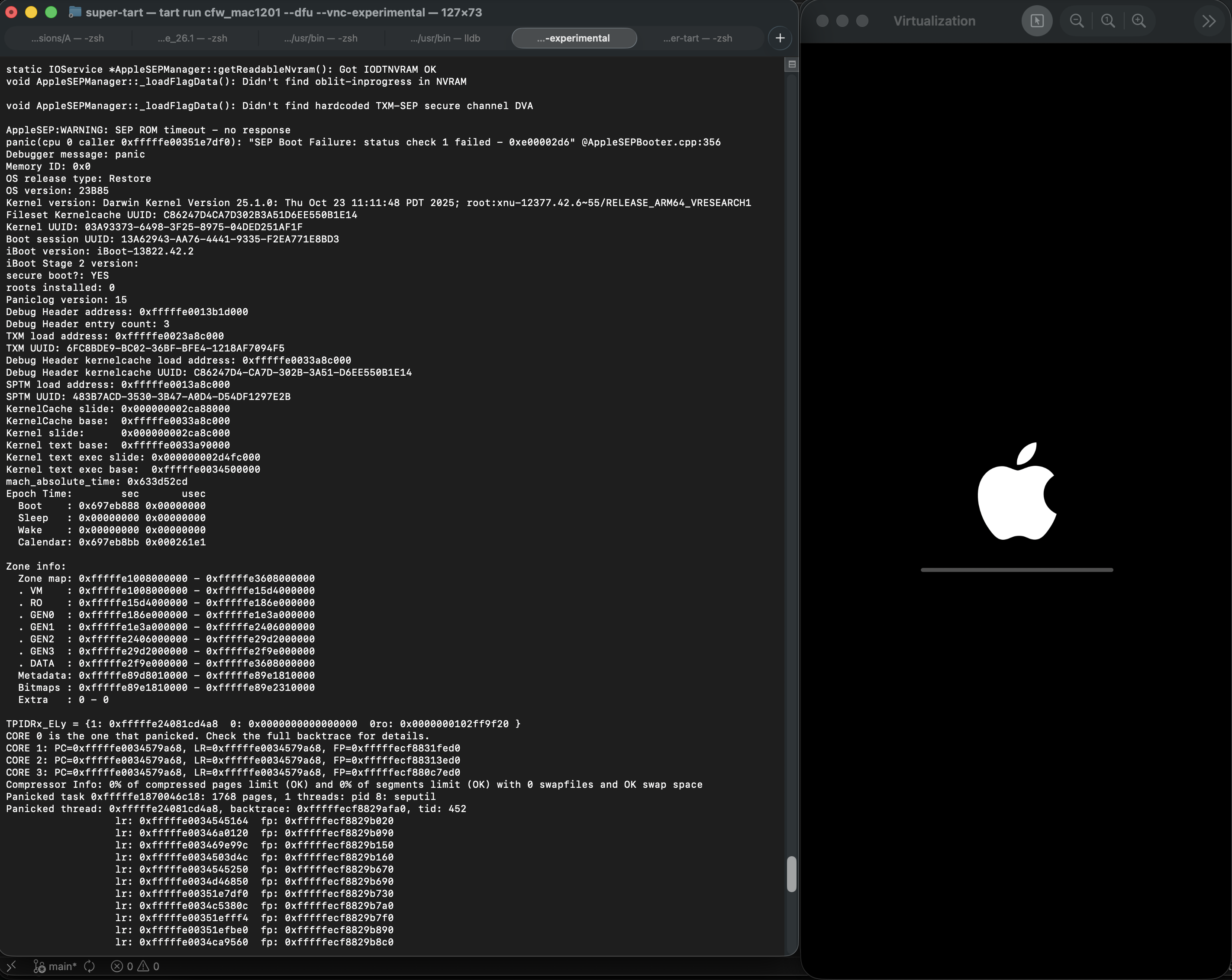
아래는 SEP 설정을 제대로하지 않으면 나타났던 패닉 사진이다. 제대로 설정했다면 무사히 넘어갈 것이다.
복원을 마치면 자동으로 재부팅된다.
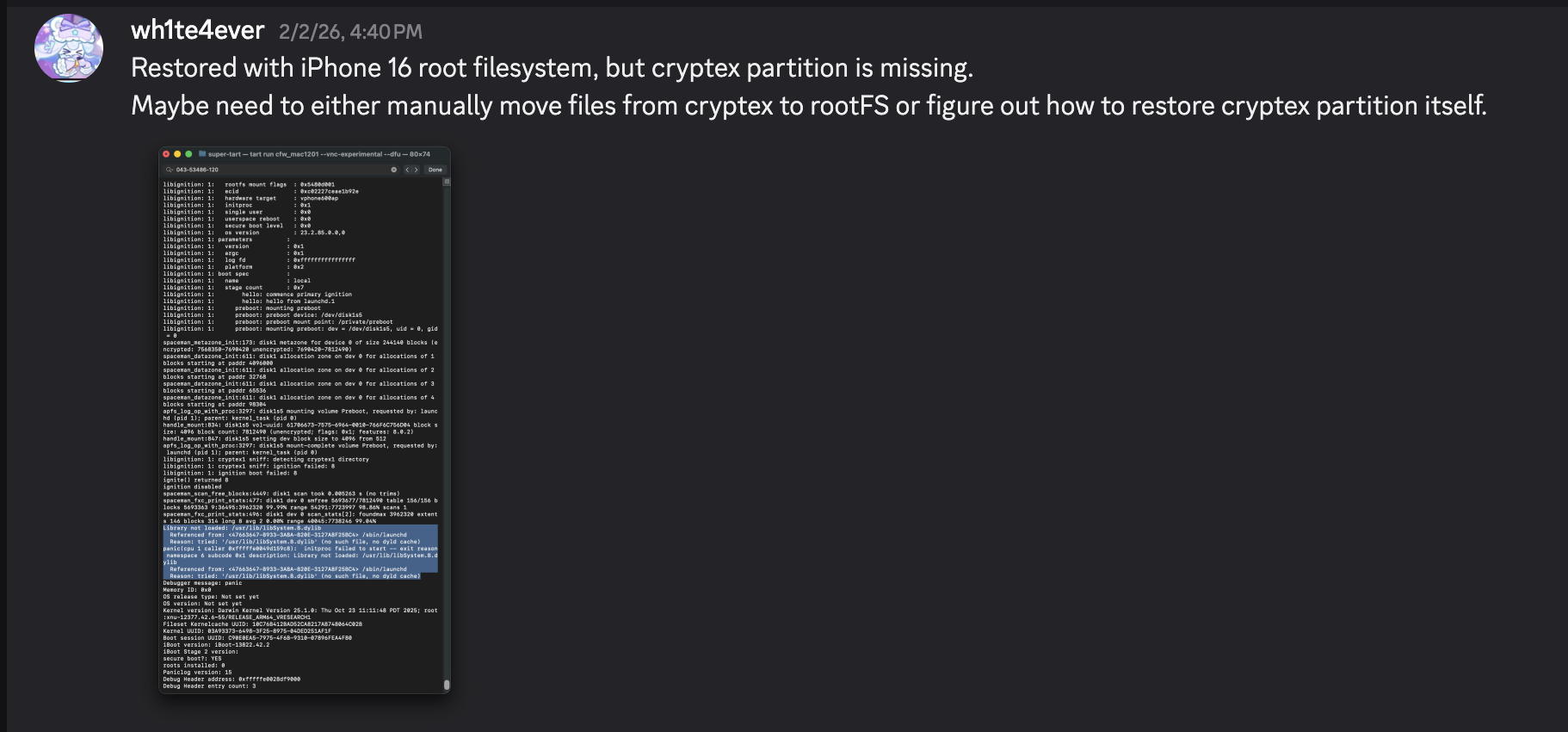
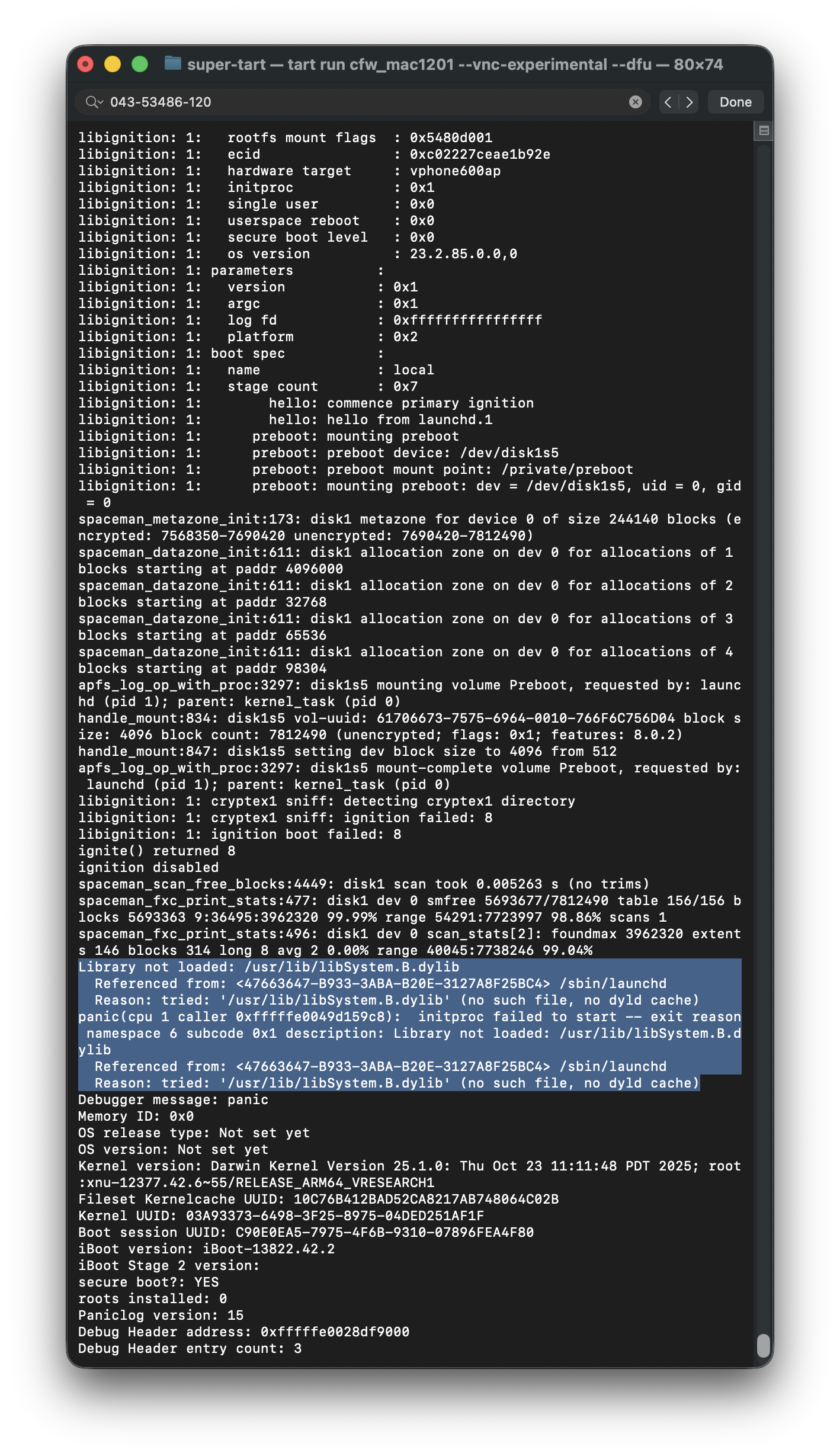
하지만 launchd 프로세스에서 /usr/lib/libSystem.B.dylib 라이브러리가 존재하지 않아 패닉이 발생해버린다.
해당 라이브러리는 Cryptex 파티션에 있는 dyld_shared_cache에 존재히며, 무슨 이유에선지 Cryptex 파티션은 복원할 수가 없었다. 임시 해결책 중 하나로써, SSH Ramdisk를 만들어서 루트 파일 시스템을 수정하여 파일을 넣어주어야 한다. 그게 바로 SSV 검증 관련 패치가 필요한 이유였다.
SSH Ramdisk로 부팅하여 부팅 고치기
https://github.com/verygenericname/SSHRD_Script에서 사용된 램디스크를 활용하여 부팅이 안되는 문제를 고쳐보려고 한다.
DFU모드에서 irecovery 툴로 부트로더나 커널 같은 구성요소를 업로드해서 로드시킬려면 IMG4 이미지가 필요하며, IM4M 파일이 필요하다. 따라서 우선 idevicerestore 툴로 shsh 파일을 먼저 가져오고, 그 다음에 Im4m 파일로 변환시켰다.
idevicerestore -e -y ./iPhone17,3_26.1_23B85_Restore -t

mv shsh/[ECID]-iPhone99,11-26.1.shsh shsh/[ECID]-iPhone99,11-26.1.shsh.gz

gunzip shsh/[ECID]-iPhone99,11-26.1.shsh.gz

...

pyimg4 im4m  extract -i shsh/[ECID]-iPhone99,11-26.1.shsh -o vphone.im4m
그리고 해당 IM4M 파일을 이용하여 펌웨어 구성요소로 사용되는 각각의 iBSS, iBEC, devicetree 등등 여러 IMG4 파일을 생성시켰다.
# 1. Grab & Patch iBSS
if not os.path.exists("iPhone17\\,3_26.1_23B85_Restore/Firmware/dfu/iBSS.vresearch101.RELEASE.im4p.bak"):
    os.system("cp iPhone17\\,3_26.1_23B85_Restore/Firmware/dfu/iBSS.vresearch101.RELEASE.im4p iPhone17\\,3_26.1_23B85_Restore/Firmware/dfu/iBSS.vresearch101.RELEASE.im4p.bak")
os.system("tools/img4 -i iPhone17\\,3_26.1_23B85_Restore/Firmware/dfu/iBSS.vresearch101.RELEASE.im4p.bak -o iBSS.vresearch101.RELEASE")
... # patch things from raw
os.system("tools/img4tool -c iBSS.vresearch101.RELEASE.im4p -t ibss iBSS.vresearch101.RELEASE")
os.system("tools/img4 -i iBSS.vresearch101.RELEASE.im4p -o ./Ramdisk/iBSS.vresearch101.RELEASE.img4 -M ./vphone.im4m")

# 2. Grab & Patch iBEC
if not os.path.exists("iPhone17\\,3_26.1_23B85_Restore/Firmware/dfu/iBEC.vresearch101.RELEASE.im4p.bak"):
    os.system("cp iPhone17\\,3_26.1_23B85_Restore/Firmware/dfu/iBEC.vresearch101.RELEASE.im4p iPhone17\\,3_26.1_23B85_Restore/Firmware/dfu/iBEC.vresearch101.RELEASE.im4p.bak")
os.system("tools/img4 -i iPhone17\\,3_26.1_23B85_Restore/Firmware/dfu/iBEC.vresearch101.RELEASE.im4p -o iBEC.vresearch101.RELEASE")
... # patch things from raw
os.system("tools/img4tool -c iBEC.vresearch101.RELEASE.im4p -t ibec iBEC.vresearch101.RELEASE")
os.system("tools/img4 -i iBEC.vresearch101.RELEASE.im4p -o Ramdisk/iBEC.vresearch101.RELEASE.img4 -M vphone.im4m")

# 3. Grab SPTM
os.system("tools/img4 -i iPhone17\\,3_26.1_23B85_Restore/Firmware/sptm.vresearch1.release.im4p -o Ramdisk/sptm.vresearch1.release.img4 -M vphone.im4m -T sptm")

# 4. Grab devicetree
os.system("tools/img4 -i iPhone17\\,3_26.1_23B85_Restore/Firmware/all_flash/DeviceTree.vphone600ap.im4p -o Ramdisk/DeviceTree.vphone600ap.img4 -M vphone.im4m -T rdtr")

# 5. Grab sep
os.system("tools/img4 -i iPhone17\\,3_26.1_23B85_Restore/Firmware/all_flash/sep-firmware.vresearch101.RELEASE.im4p -o Ramdisk/sep-firmware.vresearch101.RELEASE.img4 -M vphone.im4m -T rsep")

# 6. Grab & Patch TXM
if not os.path.exists("iPhone17\\,3_26.1_23B85_Restore/Firmware/txm.iphoneos.release.im4p.bak"):
    os.system("cp iPhone17\\,3_26.1_23B85_Restore/Firmware/txm.iphoneos.release.im4p iPhone17\\,3_26.1_23B85_Restore/Firmware/txm.iphoneos.release.im4p.bak")
os.system("pyimg4 im4p extract -i iPhone17\\,3_26.1_23B85_Restore/Firmware/txm.iphoneos.release.im4p.bak -o txm.raw")
... # patch things from raw
#create im4p
os.system("pyimg4 im4p create -i txm.raw -o txm.im4p -f trxm --lzfse")
# preserve payp structure
txm_im4p_data = Path('iPhone17,3_26.1_23B85_Restore/Firmware/txm.iphoneos.release.im4p.bak').read_bytes()
payp_offset = txm_im4p_data.rfind(b'PAYP')
if payp_offset == -1:
    print("Couldn't find payp structure !!!")
    sys.exit()

with open('txm.im4p', 'ab') as f:
    f.write(txm_im4p_data[(payp_offset-10):])

payp_sz = len(txm_im4p_data[(payp_offset-10):])
print(f"payp sz: {payp_sz}")

txm_im4p_data = bytearray(open('txm.im4p', 'rb').read())
txm_im4p_data[2:5] = (int.from_bytes(txm_im4p_data[2:5], 'big') + payp_sz).to_bytes(3, 'big')
open('txm.im4p', 'wb').write(txm_im4p_data)

# sign
os.system("pyimg4 img4 create -p txm.im4p -o Ramdisk/txm.img4 -m vphone.im4m")

# 7. Grab & patch kernelcache
if not os.path.exists("iPhone17\\,3_26.1_23B85_Restore/kernelcache.research.vphone600.bak"):
    os.system("cp iPhone17\\,3_26.1_23B85_Restore/kernelcache.research.vphone600 iPhone17\\,3_26.1_23B85_Restore/kernelcache.research.vphone600.bak")
os.system("pyimg4 im4p extract -i iPhone17\\,3_26.1_23B85_Restore/kernelcache.research.vphone600.bak -o kcache.raw")
... # patch things from raw

#create im4p
os.system("pyimg4 im4p create -i kcache.raw -o krnl.im4p -f rkrn --lzfse")

# preserve payp structure
kernel_im4p_data = Path('iPhone17,3_26.1_23B85_Restore/kernelcache.research.vphone600.bak').read_bytes()
payp_offset = kernel_im4p_data.rfind(b'PAYP')
if payp_offset == -1:
    print("Couldn't find payp structure !!!")
    sys.exit()

with open('krnl.im4p', 'ab') as f:
    f.write(kernel_im4p_data[(payp_offset-10):])

payp_sz = len(kernel_im4p_data[(payp_offset-10):])
print(f"payp sz: {payp_sz}")

kernel_im4p_data = bytearray(open('krnl.im4p', 'rb').read())
kernel_im4p_data[2:5] = (int.from_bytes(kernel_im4p_data[2:5], 'big') + payp_sz).to_bytes(3, 'big')
open('krnl.im4p', 'wb').write(kernel_im4p_data)

# sign
os.system("pyimg4 img4 create -p krnl.im4p -o Ramdisk/krnl.img4 -m vphone.im4m")

# 8. Grab ramdisk & build custom ramdisk
os.system("pyimg4 im4p extract -i iPhone17,3_26.1_23B85_Restore/043-53775-129.dmg -o ramdisk.dmg")
os.system("mkdir SSHRD")
os.system("sudo hdiutil attach -mountpoint SSHRD ramdisk.dmg -owners off")
os.system("sudo hdiutil create -size 254m -imagekey diskimage-class=CRawDiskImage -format UDZO -fs APFS -layout NONE -srcfolder SSHRD -copyuid root ramdisk1.dmg")
os.system("sudo hdiutil detach -force SSHRD")
os.system("sudo hdiutil attach -mountpoint SSHRD ramdisk1.dmg -owners off")

... #remove unneccessary files for expand space

#resign all things preserving ents
target_path= [
    "SSHRD/usr/local/bin/*", "SSHRD/usr/local/lib/*",
    "SSHRD/usr/bin/*", "SSHRD/bin/*",
    "SSHRD/usr/lib/*", "SSHRD/sbin/*", "SSHRD/usr/sbin/*", "SSHRD/usr/libexec/*"
]
for pattern in target_path:
    for path in glob.glob(pattern):
        if os.path.isfile(path) and not os.path.islink(path):
            if "Mach-O" in subprocess.getoutput(f"file \"{path}\""):
                os.system(f"tools/ldid_macosx_arm64 -S -M -Cadhoc \"{path}\"")

#8-2. Grab & build custom ramdisk's trustcache while building custom ramdisk
os.system("pyimg4 im4p extract -i iPhone17,3_26.1_23B85_Restore/Firmware/043-53775-129.dmg.trustcache -o trustcache.raw")
os.system("tools/trustcache_macos_arm64 create sshrd.tc SSHRD")
os.system("pyimg4 im4p create -i sshrd.tc -o trustcache.im4p -f rtsc")
# sign
os.system("pyimg4 img4 create -p trustcache.im4p -o Ramdisk/trustcache.img4 -m vphone.im4m")
#8-2. end

os.system("sudo hdiutil detach -force SSHRD")
os.system("sudo hdiutil resize -sectors min ramdisk1.dmg")
# sign
os.system("pyimg4 im4p create -i ramdisk1.dmg -o ramdisk1.dmg.im4p -f rdsk")
os.system("pyimg4 img4 create -p ramdisk1.dmg.im4p -o Ramdisk/ramdisk.img4 -m vphone.im4m")
IMG4 이미지를 다 만들었다면, 이제 하나씩 로드시켜서 Ramdisk로 부팅해보자.
- boot_rd.sh
#!/bin/zsh
irecovery -f Ramdisk/iBSS.vresearch101.RELEASE.img4
irecovery -f Ramdisk/iBEC.vresearch101.RELEASE.img4
irecovery -c go

sleep 1;
irecovery -f Ramdisk/sptm.vresearch1.release.img4
irecovery -c firmware

irecovery -f Ramdisk/txm.img4
irecovery -c firmware

irecovery -f Ramdisk/trustcache.img4
irecovery -c firmware
irecovery -f Ramdisk/ramdisk.img4
irecovery -c ramdisk
irecovery -f Ramdisk/DeviceTree.vphone600ap.img4
irecovery -c devicetree
irecovery -f Ramdisk/sep-firmware.vresearch101.RELEASE.img4
irecovery -c firmware
irecovery -f Ramdisk/krnl.img4
irecovery -c bootx
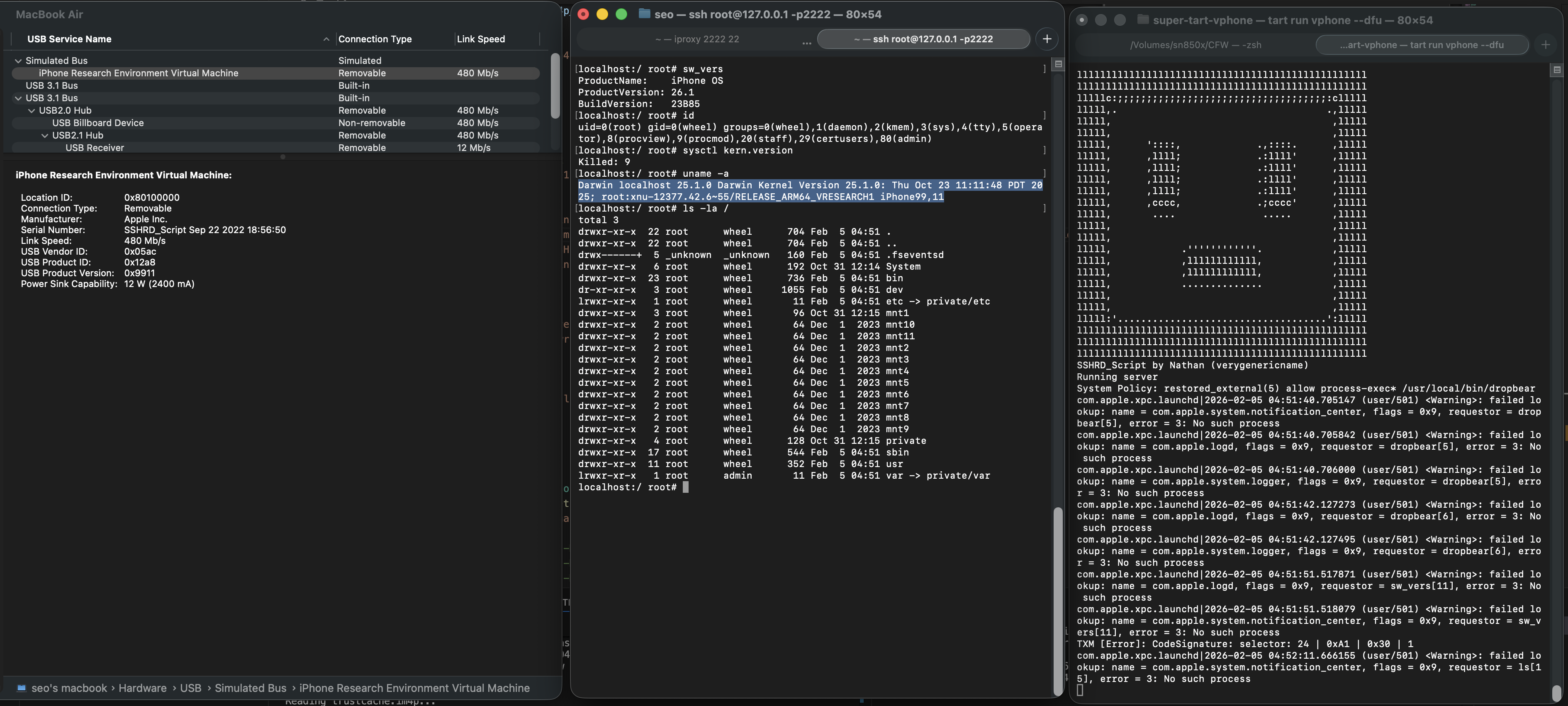
그러면 아래와 같이 왼쪽에서 3번째 창에 있는, 마인크래프트 게임 속의 크리퍼 모양 얼굴을 보게 될 것이다.
System Information 앱에서 USB 메뉴를 보면 “iPhone Research …”가 나타나있다면,
이제 iproxy툴을 이용해서 가상아이폰 쉘에 접근할 수 있다. (iproxy 2222 22 &)
루트 파일시스템을 수정하기 위해 snapshot 이름을 변경해준다.
ssh root@127.0.0.1 -p2222
#pw: alpine

mount_apfs -o rw /dev/disk1s1 /mnt1

snaputil -l /mnt1
# (then will output will be printed with hash, result may be differ)
com.apple.os.update-8AAB8DBA5C8F1F756928411675F4A892087B04559CFB084B9E400E661ABAD119

snaputil -n <com.apple.os.update-hash> orig-fs /mnt1

umount /mnt1

exit
AEA 파일은 ipsw 툴로 복호화하여 dmg 파일로 만들고 마운트시킨다음, Cryptex 파티션에 있는 파일들을 가상머신으로 전송시킨다.
파일 전송 뿐만 아니라 특정 패치가 필요했으며, 편의상 부팅될때 특정 3개의 프로세스인 bash, dropbear, trollvnc를 추가해주었다.
seputil은 gigalocker라는 파일을 제대로 찾지 못하는 문제가 있어서 AA.gl 로 항상 찾을 수 있게 만들었으며, launchd_cache_loader은 수정된 /System/Library/xpc/launchd.plist가 로드가 잘되게끔 패치하였다.
...
 ========= INSTALL CRYPTEX(SystemOS, AppOS) =========
# Grab and Decrypt Cryptex(SystemOS) AEA
key = subprocess.check_output("ipsw fw aea --key iPhone17,3_26.1_23B85_Restore/043-54303-126.dmg.aea", shell=True, text=True).strip()
print(f"key: {key}")
os.system(f"aea decrypt -i iPhone17,3_26.1_23B85_Restore/043-54303-126.dmg.aea -o CryptexSystemOS.dmg -key-value '{key}'")

# Grab Cryptex(AppOS)
os.system(f"cp iPhone17,3_26.1_23B85_Restore/043-54062-129.dmg CryptexAppOS.dmg")

# Mount CryptexSystemOS
os.system("mkdir CryptexSystemOS")
os.system("sudo hdiutil attach -mountpoint CryptexSystemOS CryptexSystemOS.dmg -owners off")

# Mount CryptexAppOS
os.system("mkdir CryptexAppOS")
os.system("sudo hdiutil attach -mountpoint CryptexAppOS CryptexAppOS.dmg -owners off")

# Prepare
remote_cmd("/sbin/mount_apfs -o rw /dev/disk1s1 /mnt1")

remote_cmd("/bin/rm -rf /mnt1/System/Cryptexes/App")
remote_cmd("/bin/rm -rf /mnt1/System/Cryptexes/OS")

remote_cmd("/bin/mkdir -p /mnt1/System/Cryptexes/App")
remote_cmd("/bin/chmod 0755 /mnt1/System/Cryptexes/App")
remote_cmd("/bin/mkdir -p /mnt1/System/Cryptexes/OS")
remote_cmd("/bin/chmod 0755 /mnt1/System/Cryptexes/OS")

# send Cryptex files to device
print("Copying cryptexs to vphone! Will take about 3 mintues...")
os.system("tools/sshpass -p 'alpine' scp -q -r -ostricthostkeychecking=false -ouserknownhostsfile=/dev/null -o StrictHostKeyChecking=no -P 2222 CryptexSystemOS/. 'root@127.0.0.1:/mnt1/System/Cryptexes/OS'")
os.system("tools/sshpass -p 'alpine' scp -q -r -ostricthostkeychecking=false -ouserknownhostsfile=/dev/null -o StrictHostKeyChecking=no -P 2222 CryptexAppOS/. 'root@127.0.0.1:/mnt1/System/Cryptexes/App'")

# Thanks nathan for idea
# /System/Library/Caches/com.apple.dyld -> /System/Cryptexes/OS/System/Library/Caches/com.apple.dyld/
remote_cmd("/bin/ln -sf ../../../System/Cryptexes/OS/System/Library/Caches/com.apple.dyld /mnt1/System/Library/Caches/com.apple.dyld")
# /System/DriverKit/System/Library/dyld -> /System/Cryptexes/OS/System/DriverKit/System/Library/dyld
remote_cmd("/bin/ln -sf ../../../../System/Cryptexes/OS/System/DriverKit/System/Library/dyld /mnt1/System/DriverKit/System/Library/dyld")

# ========= PATCH SEPUTIL =========
# remove if already exist
os.system("rm custom_26.1/seputil 2>/dev/null")
os.system("rm custom_26.1/seputil.bak 2>/dev/null")
# backup seputil before patch
file_path = "/mnt1/usr/libexec/seputil.bak"
if not check_remote_file_exists(file_path):
     print(f"Created backup {file_path}")
     remote_cmd("/bin/cp /mnt1/usr/libexec/seputil /mnt1/usr/libexec/seputil.bak")
# grab seputil
os.system("tools/sshpass -p 'alpine' scp -q -o StrictHostKeyChecking=no -o UserKnownHostsFile=/dev/null -P 2222 root@127.0.0.1:/mnt1/usr/libexec/seputil.bak ./custom_26.1")
os.system("mv custom_26.1/seputil.bak custom_26.1/seputil")
# patch seputil; prevent error "seputil: Gigalocker file (/mnt7/XXXXXXXX-XXXX-XXXX-XXXX-XXXXXXXXXXXX.gl) doesn't exist: No such file or directory"
fp = open("custom_26.1/seputil", "r+b")
patch(0x1B3F1, "AA")
fp.close()
# sign
os.system("tools/ldid_macosx_arm64 -S -M -Ksigncert.p12 -Icom.apple.seputil custom_26.1/seputil")
# send to apply
os.system("tools/sshpass -p 'alpine' scp -q -r -ostricthostkeychecking=false -ouserknownhostsfile=/dev/null -o StrictHostKeyChecking=no -P 2222 custom_26.1/seputil 'root@127.0.0.1:/mnt1/usr/libexec/seputil'")
remote_cmd("/bin/chmod 0755 /mnt1/usr/libexec/seputil")
# clean
os.system("rm custom_26.1/seputil 2>/dev/null")

# Change gigalocker filename to AA.gl
remote_cmd("/sbin/mount_apfs -o rw /dev/disk1s3 /mnt3")
remote_cmd("/bin/mv /mnt3/*.gl /mnt3/AA.gl")

... # ========= INSTALL AppleParavirtGPUMetalIOGPUFamily =========

# ========= INSTALL iosbinpack64 =========
# Send to rootfs
os.system("tools/sshpass -p 'alpine' scp -q -r -ostricthostkeychecking=false -ouserknownhostsfile=/dev/null -o StrictHostKeyChecking=no -P 2222 jb/iosbinpack64.tar 'root@127.0.0.1:/mnt1'")
# Unpack
remote_cmd("/usr/bin/tar --preserve-permissions --no-overwrite-dir -xvf /mnt1/iosbinpack64.tar  -C /mnt1")
remote_cmd("/bin/rm /mnt1/iosbinpack64.tar")
# Setup initial dropbear after normal boot
'''
/iosbinpack64/bin/mkdir -p /var/dropbear
/iosbinpack64/bin/cp /iosbinpack64/etc/profile /var/profile
/iosbinpack64/bin/cp /iosbinpack64/etc/motd /var/motd
'''

# ========= PATCH launchd_cache_loader (patch required if modifying /System/Library/xpc/launchd.plist) =========
# remove if already exist
os.system("rm custom_26.1/launchd_cache_loader 2>/dev/null")
os.system("rm custom_26.1/launchd_cache_loader.bak 2>/dev/null")
# backup launchd_cache_loader before patch
file_path = "/mnt1/usr/libexec/launchd_cache_loader.bak"
if not check_remote_file_exists(file_path):
     print(f"Created backup {file_path}")
     remote_cmd("/bin/cp /mnt1/usr/libexec/launchd_cache_loader /mnt1/usr/libexec/launchd_cache_loader.bak")
# grab launchd_cache_loader
os.system("tools/sshpass -p 'alpine' scp -q -o StrictHostKeyChecking=no -o UserKnownHostsFile=/dev/null -P 2222 root@127.0.0.1:/mnt1/usr/libexec/launchd_cache_loader.bak ./custom_26.1")
os.system("mv custom_26.1/launchd_cache_loader.bak custom_26.1/launchd_cache_loader")
# patch to apply launchd_unsecure_cache=1
fp = open("custom_26.1/launchd_cache_loader", "r+b")
patch(0xB58, 0xd503201f)
fp.close()
# sign
os.system("tools/ldid_macosx_arm64 -S -M -Ksigncert.p12 -Icom.apple.launchd_cache_loader custom_26.1/launchd_cache_loader")
# send to apply
os.system("tools/sshpass -p 'alpine' scp -q -r -ostricthostkeychecking=false -ouserknownhostsfile=/dev/null -o StrictHostKeyChecking=no -P 2222 custom_26.1/launchd_cache_loader 'root@127.0.0.1:/mnt1/usr/libexec/launchd_cache_loader'")
remote_cmd("/bin/chmod 0755 /mnt1/usr/libexec/launchd_cache_loader")
# clean
os.system("rm custom_26.1/launchd_cache_loader 2>/dev/null")

# ========= MAKE RUN bash, dropbear, trollvnc automatically when boot =========
# Send plist to /System/Library/LaunchDaemons
os.system("tools/sshpass -p 'alpine' scp -q -r -ostricthostkeychecking=false -ouserknownhostsfile=/dev/null -o StrictHostKeyChecking=no -P 2222 jb/LaunchDaemons/bash.plist 'root@127.0.0.1:/mnt1/System/Library/LaunchDaemons'")
os.system("tools/sshpass -p 'alpine' scp -q -r -ostricthostkeychecking=false -ouserknownhostsfile=/dev/null -o StrictHostKeyChecking=no -P 2222 jb/LaunchDaemons/dropbear.plist 'root@127.0.0.1:/mnt1/System/Library/LaunchDaemons'")
os.system("tools/sshpass -p 'alpine' scp -q -r -ostricthostkeychecking=false -ouserknownhostsfile=/dev/null -o StrictHostKeyChecking=no -P 2222 jb/LaunchDaemons/trollvnc.plist 'root@127.0.0.1:/mnt1/System/Library/LaunchDaemons'")
remote_cmd("/bin/chmod 0644 /mnt1/System/Library/LaunchDaemons/bash.plist")
remote_cmd("/bin/chmod 0644 /mnt1/System/Library/LaunchDaemons/dropbear.plist")
remote_cmd("/bin/chmod 0644 /mnt1/System/Library/LaunchDaemons/trollvnc.plist")

# Edit /System/Library/xpc/launchd.plist
# remove if already exist
os.system("rm custom_26.1/launchd.plist 2>/dev/null")
os.system("rm custom_26.1/launchd.plist.bak 2>/dev/null")
# backup launchd.plist before patch
file_path = "/mnt1/System/Library/xpc/launchd.plist.bak"
if not check_remote_file_exists(file_path):
     print(f"Created backup {file_path}")
     remote_cmd("/bin/cp /mnt1/System/Library/xpc/launchd.plist /mnt1/System/Library/xpc/launchd.plist.bak")
# grab launchd.plist
os.system("tools/sshpass -p 'alpine' scp -q -o StrictHostKeyChecking=no -o UserKnownHostsFile=/dev/null -P 2222 root@127.0.0.1:/mnt1/System/Library/xpc/launchd.plist.bak ./custom_26.1")
os.system("mv custom_26.1/launchd.plist.bak custom_26.1/launchd.plist")

# Inject bash, dropbear, trollvnc to launchd.plist
os.system("plutil -convert xml1 custom_26.1/launchd.plist")

# 1. bash
target_file = 'custom_26.1/launchd.plist'
source_file = 'jb/LaunchDaemons/bash.plist'
insert_key  = '/System/Library/LaunchDaemons/bash.plist'

with open(target_file, 'rb') as ft, open(source_file, 'rb') as fs:
    target_data = plistlib.load(ft)
    source_data = plistlib.load(fs)

target_data.setdefault('LaunchDaemons', {})[insert_key] = source_data

with open(target_file, 'wb') as f:
    plistlib.dump(target_data, f, sort_keys=False)

# 2. dropbear
source_file = 'jb/LaunchDaemons/dropbear.plist'
insert_key  = '/System/Library/LaunchDaemons/dropbear.plist'

with open(target_file, 'rb') as ft, open(source_file, 'rb') as fs:
    target_data = plistlib.load(ft)
    source_data = plistlib.load(fs)

target_data.setdefault('LaunchDaemons', {})[insert_key] = source_data

with open(target_file, 'wb') as f:
    plistlib.dump(target_data, f, sort_keys=False)

# 3. trollvnc
source_file = 'jb/LaunchDaemons/trollvnc.plist'
insert_key  = '/System/Library/LaunchDaemons/trollvnc.plist'

with open(target_file, 'rb') as ft, open(source_file, 'rb') as fs:
    target_data = plistlib.load(ft)
    source_data = plistlib.load(fs)

target_data.setdefault('LaunchDaemons', {})[insert_key] = source_data

with open(target_file, 'wb') as f:
    plistlib.dump(target_data, f, sort_keys=False)

# send to apply
os.system("tools/sshpass -p 'alpine' scp -q -r -ostricthostkeychecking=false -ouserknownhostsfile=/dev/null -o StrictHostKeyChecking=no -P 2222 custom_26.1/launchd.plist 'root@127.0.0.1:/mnt1/System/Library/xpc'")
remote_cmd("/bin/chmod 0644 /mnt1/System/Library/xpc/launchd.plist")
# clean
os.system("rm custom_26.1/launchd.plist 2>/dev/null")
# ========= End of MAKE RUN bash, dropbear, trollvnc automatically when boot =========

...
remote_cmd("/sbin/halt")
...
첫번째 부팅 시도
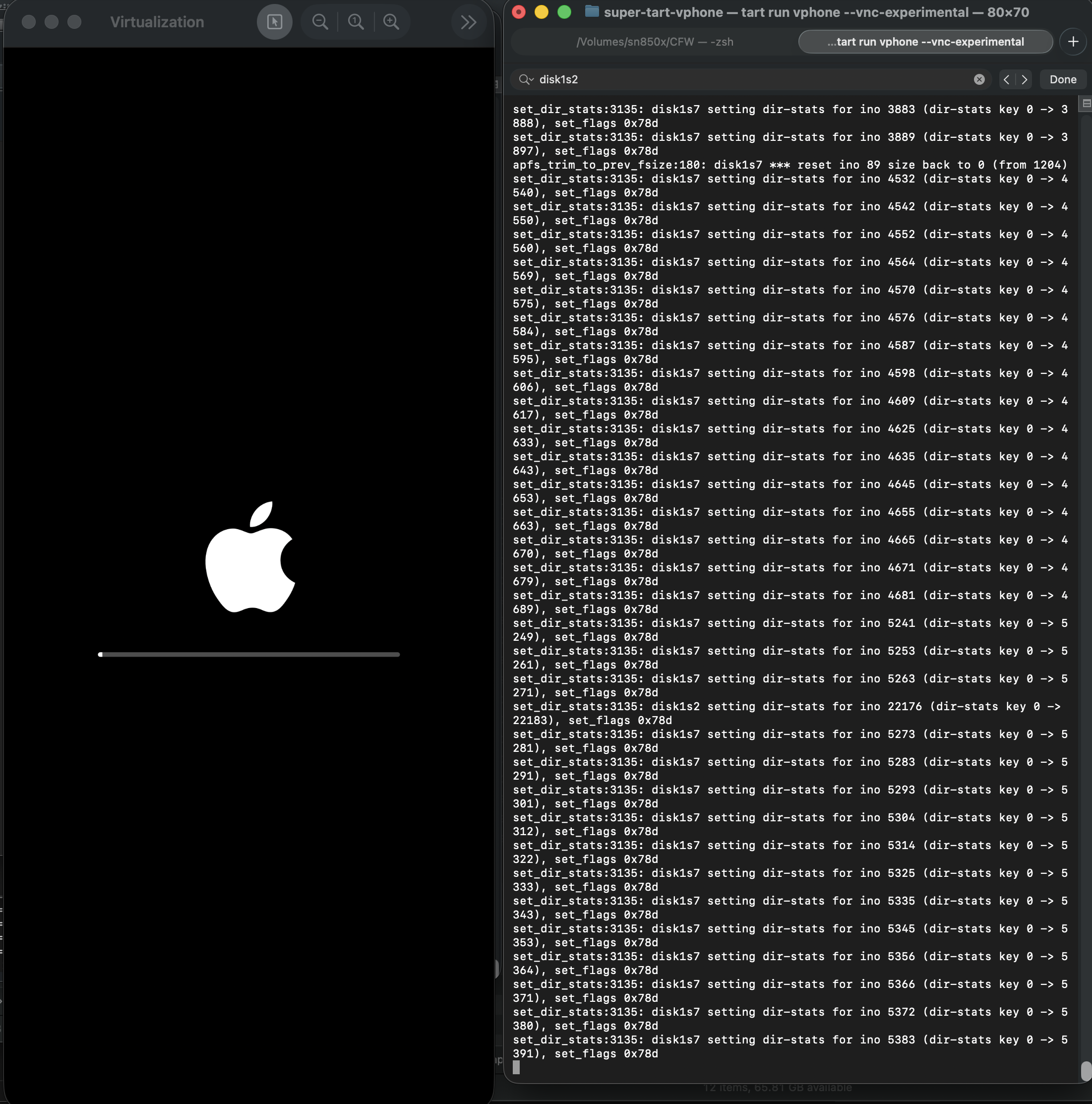
이제 부팅이 잘되긴 하겠지만, 검은 배경화면인 셋업 스크린에서 넘어갈려고 하면 리스프링되면서 더이상 넘어가지 않는다.
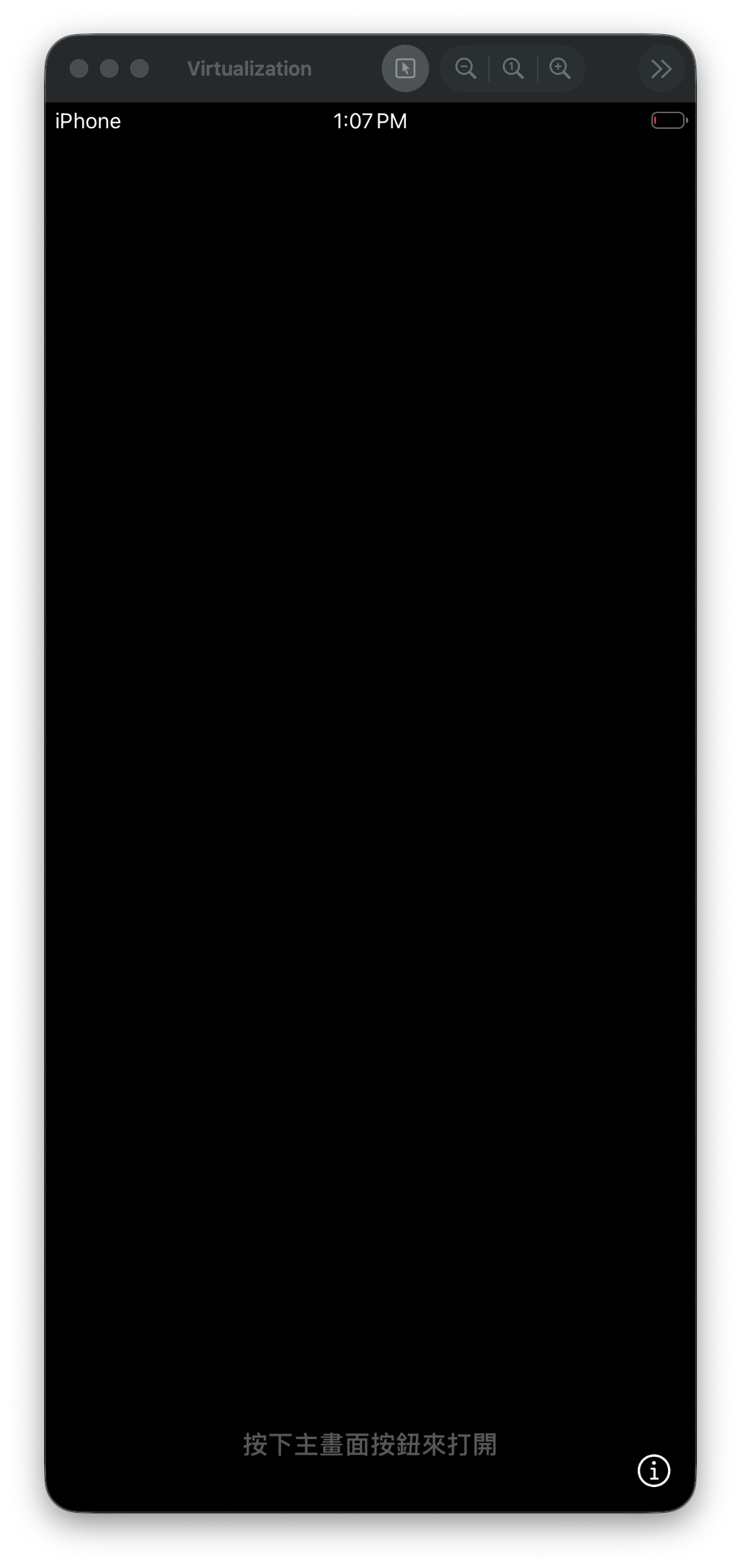
Metal 구현
MetalTest라는 프로그램을 만들어서 확인해보면, Metal이 지원되지 않는다고 나온다.
#import <stdio.h>
#import <Metal/Metal.h>
#import <Foundation/Foundation.h>

int main(int argc, char *argv[], char *envp[]) {
    id<MTLDevice> device = MTLCreateSystemDefaultDevice();
    NSLog(@"device: %@", device);

    if (device) {
        NSLog(@"Metal Device Create Success: %@", [device name]);
    } else {
        NSLog(@"Metal Not Supported!");
    }

    return 0;
}
- 실행 결과
-bash-4.4# ./MetalTest
2026-02-08 22:49:02.293 MetalTest[633:9434] device: (null)
2026-02-08 22:49:02.294 MetalTest[633:9434] Metal Not Supported!
-bash-4.4# sysctl kern.version
kern.version: Darwin Kernel Version 25.1.0: Thu Oct 23 11:11:48 PDT 2025; root:xnu-12377.42.6~55/RELEASE_ARM64_VRESEARCH1
원래라면, 아래와 같은 결과가 나와야했을 것이다.
seo@seos-Virtual-Machine Desktop % sysctl kern.version
kern.version: Darwin Kernel Version 25.0.0: Mon Aug 25 21:17:21 PDT 2025; root:xnu-12377.1.9~3/RELEASE_ARM64_VMAPPLE
seo@seos-Virtual-Machine Desktop % ./MetalTest
2026-02-08 23:16:56.846 MetalTest[682:5810] device: <AppleParavirtDevice: 0x102c48fe0>
    name = Apple Paravirtual device
2026-02-08 23:16:56.847 MetalTest[682:5810] Metal Device Create Success: Apple Paravirtual device
seo@seos-Virtual-Machine Desktop %
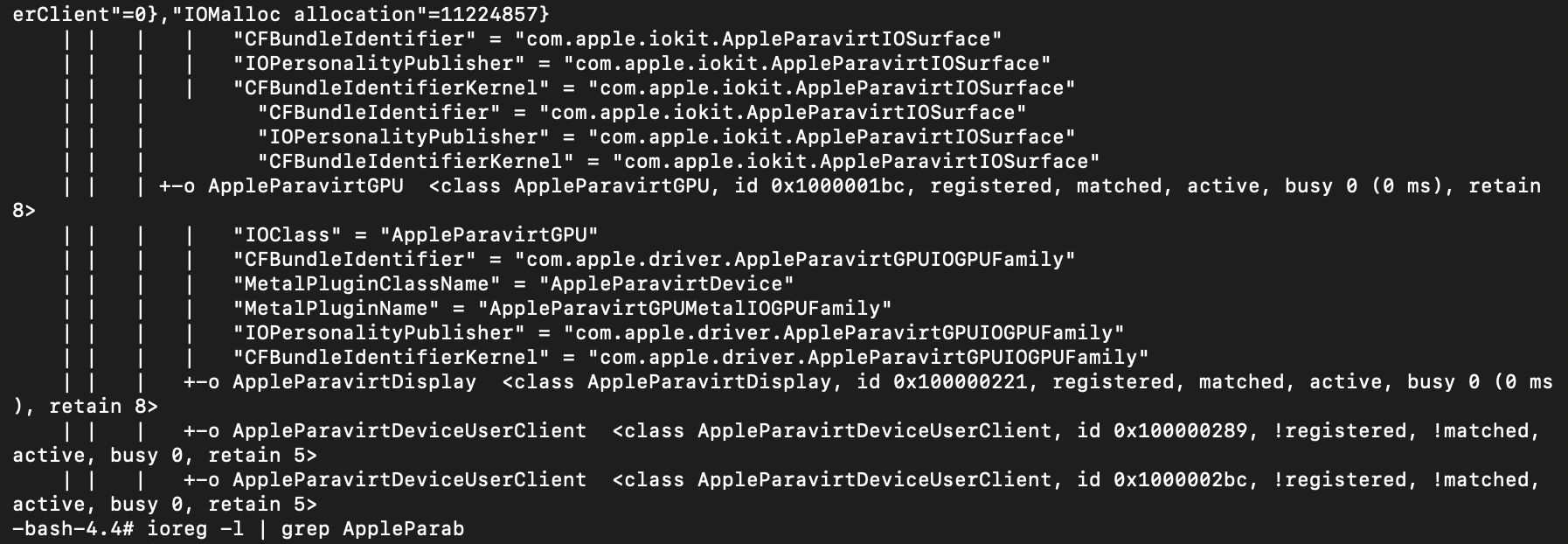
ioreg -l로 확인해보면, 보다시피 커널상에서는 AppleParavirtGPU를 인식하고 있었다.
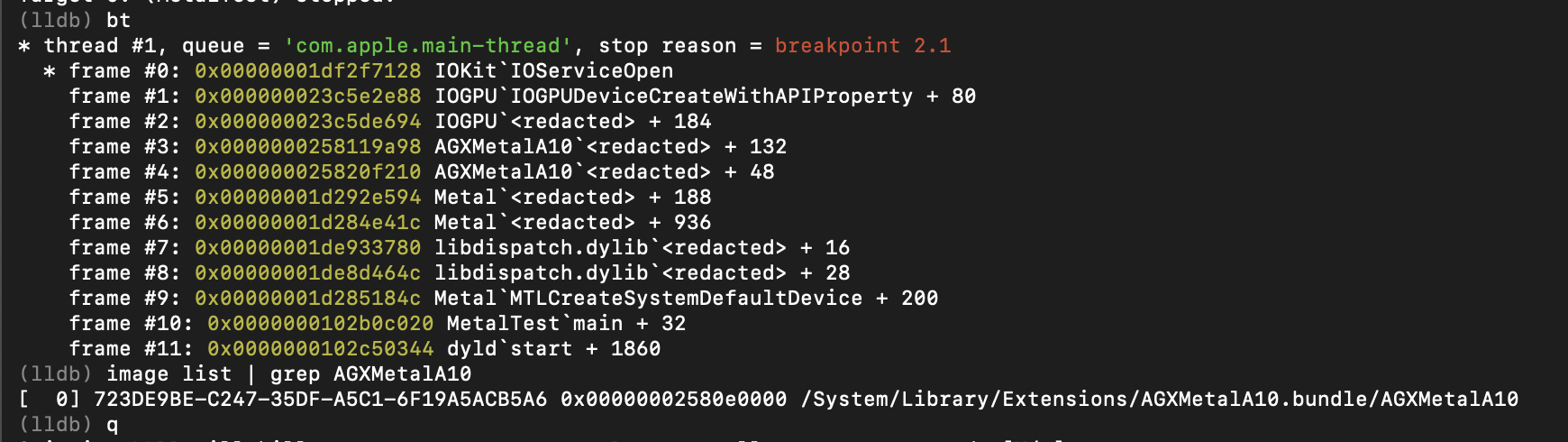
아이패드7세대/iOS 16.6.1에서 확인해보면 MTLCreateSystemDefaultDevice 함수를 호출할때, 내부적으로 AGXMetalA10이라는 특정 라이브러리를 통해서 IOGPU 드라이버에 접근한다. 해당 AGXMetalA10 라이브러리는 /System/Library/Extensions에 있다.
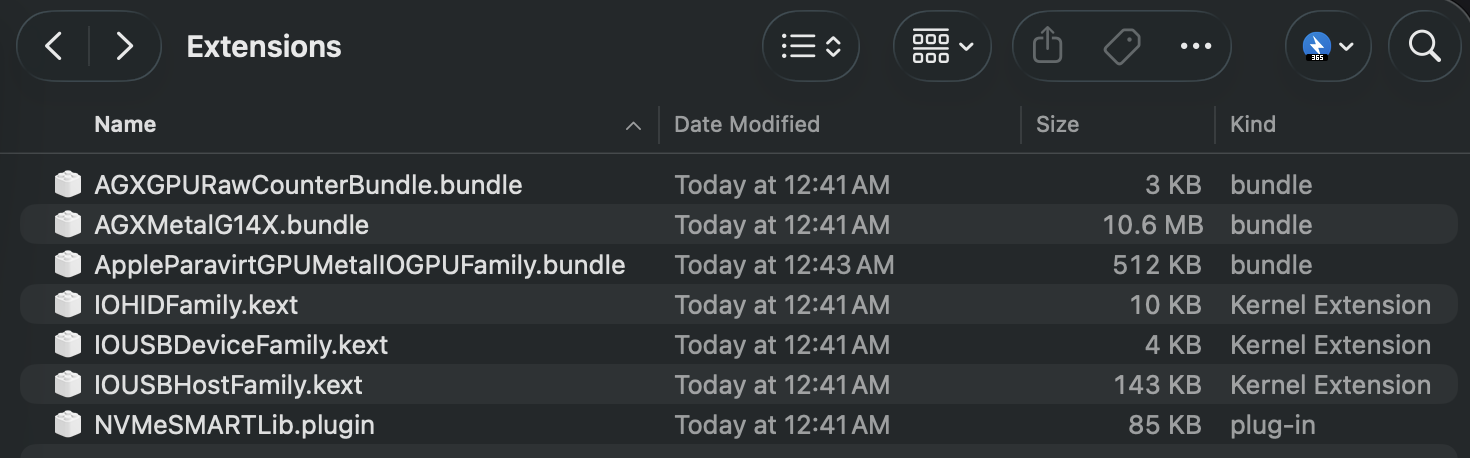
여기서 갑자기 떠오른 생각은 가상아이폰에도 쓰이는 GPU/Metal 관련 라이브러리가 있지 않을까?
해당경로를 PCC 가상머신에서 확인해보면 7개의 파일들이 존재한다.
PCC에 사용되는 /System/Library/Extensions/AppleParavirtGPUMetalIOGPUFamily.bundle을 그대로 가상아이폰에 가져다놓아보았다. (SSH Ramdisk 사용함)
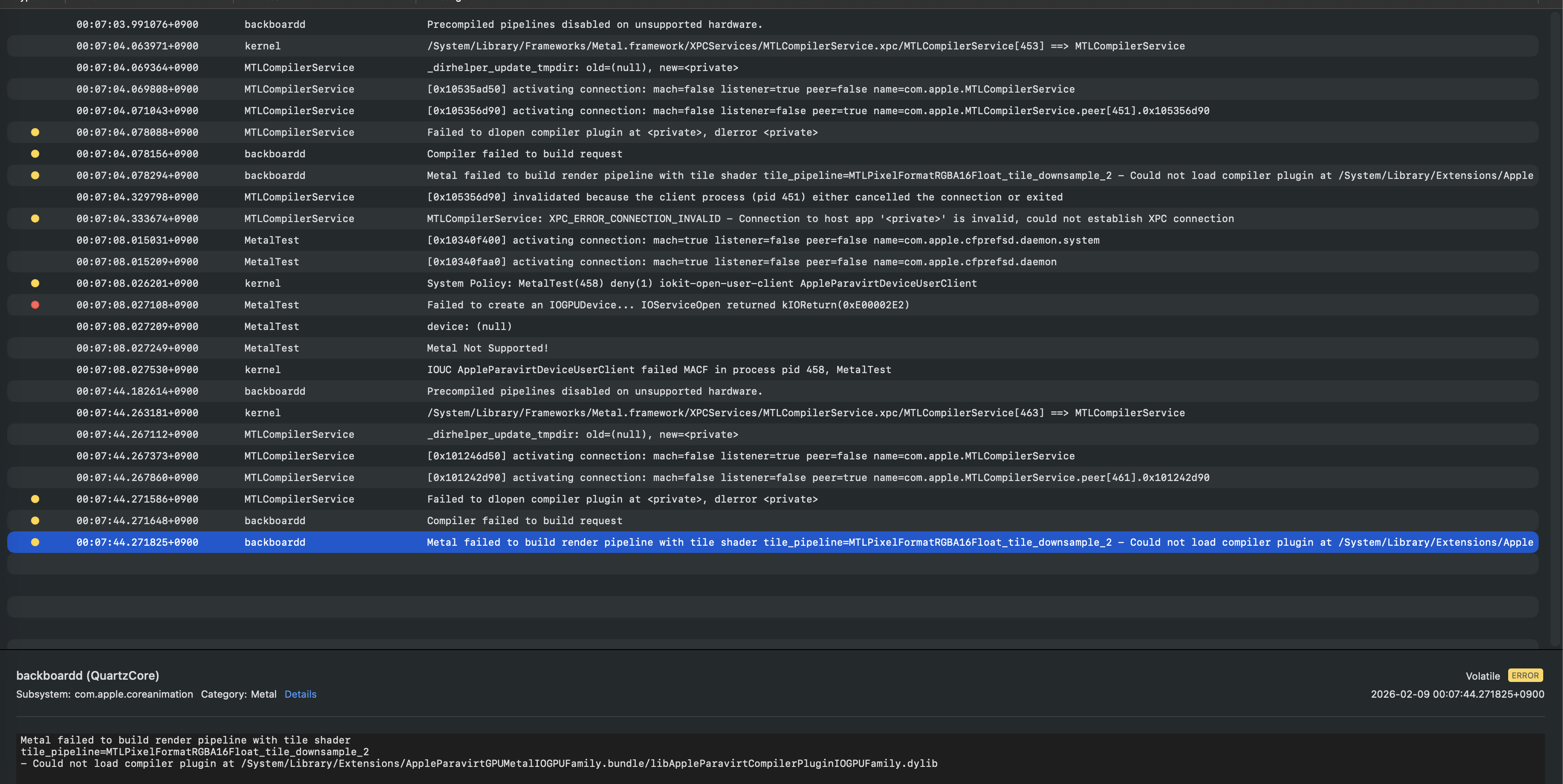
MetalTest를 다시 확인해보면, 제대로 MTLCreateSystemDefaultDevice 함수가 잘 작동한다.

그러나 특정 dylib 파일이 아이폰16 모델의 dsc에는 존재하지 않기 때문에, pcc에 있는 dsc를 따로 리버싱해서 구현해줄 필요가 있었다.
- /System/Library/Extensions/AppleParavirtGPUMetalIOGPUFamily.bundle/libAppleParavirtCompilerPluginIOGPUFamily.dylib

두번째 부팅 시도
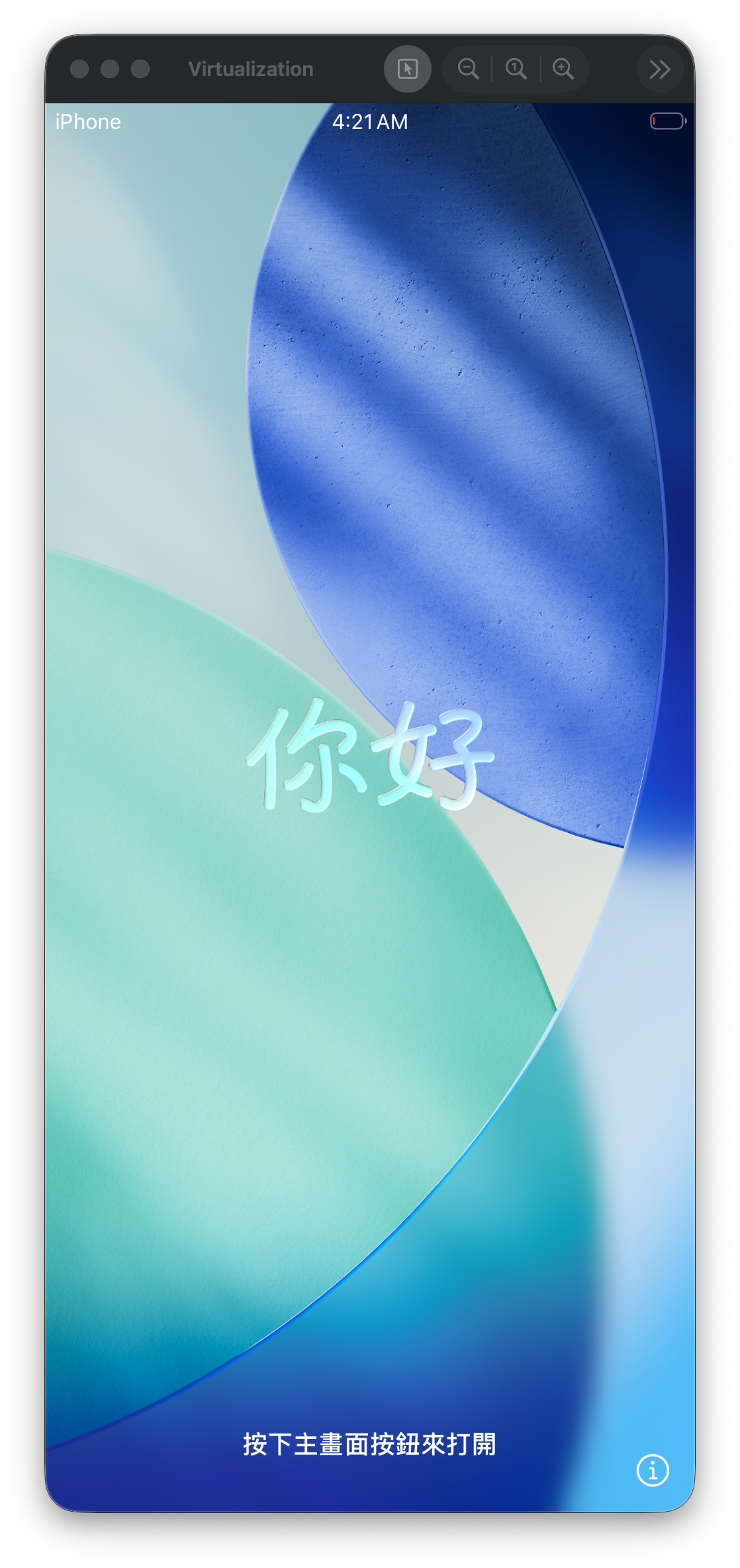
구현하고 나면, 이제 배경이 있는 셋업 화면을 반겨준다.
홈버튼을 제대로 구현할 수가 없기 때문에 임시방편으로 iproxy/vnc를 통해 조작하여 해결하였다.
호환성
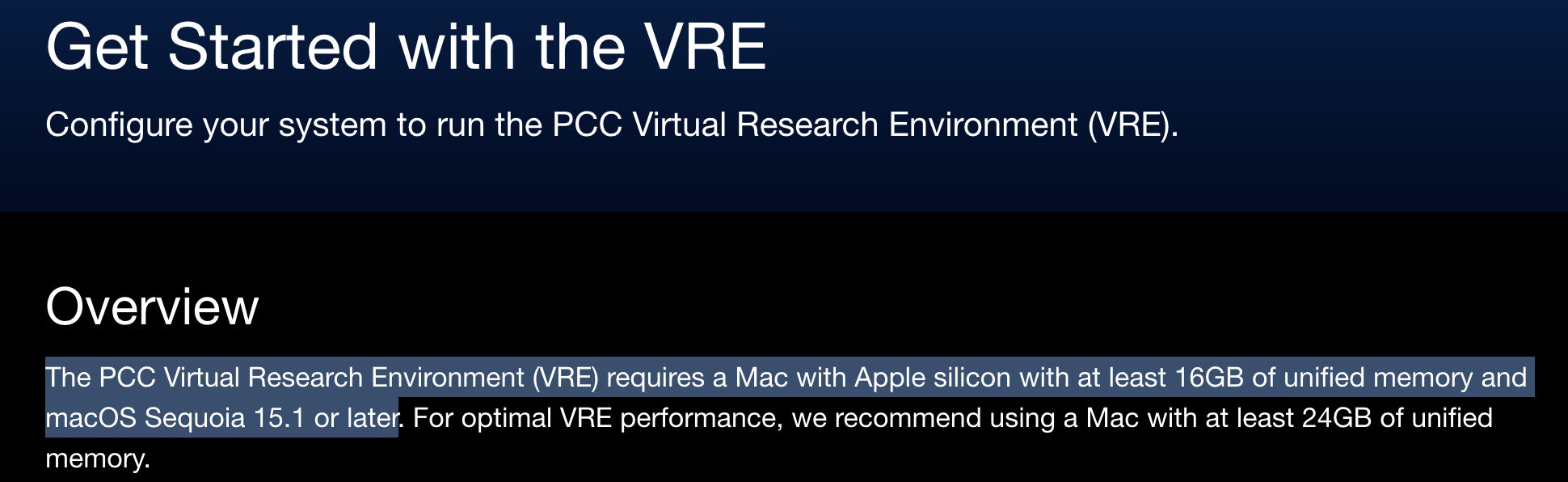
애플 실리콘 맥에서만 호환되며, 작동 확인된 기기/버전은 다음과 같았다.
- Apple M3, 16G RAM, Sequoia 15.7.4
- Apple M1 Pro, 32G RAM, Tahoe 26.3
아마 pccvre 지원하는 대상이면, 전부 다 되지 않을까 예상해본다.
출처: https://security.apple.com/documentation/private-cloud-compute/vresetup
Sequoia에서 터치 상호작용 가능하게 만들기
Tahoe 26버전과는 달리 VZVirtualMachineView 객체만으로는 터치 상호작용이 안되기 때문에 마우스 작동함수 관련해서 오버라이딩이 필요하였다.
프로젝트 소스코드
- https://github.com/wh1te4ever/super-tart-vphone